Support our educational content for free when you purchase through links on our site. Learn more
🏆 7 Top Desktop FF 3D Printer of the Year Awards (2026)

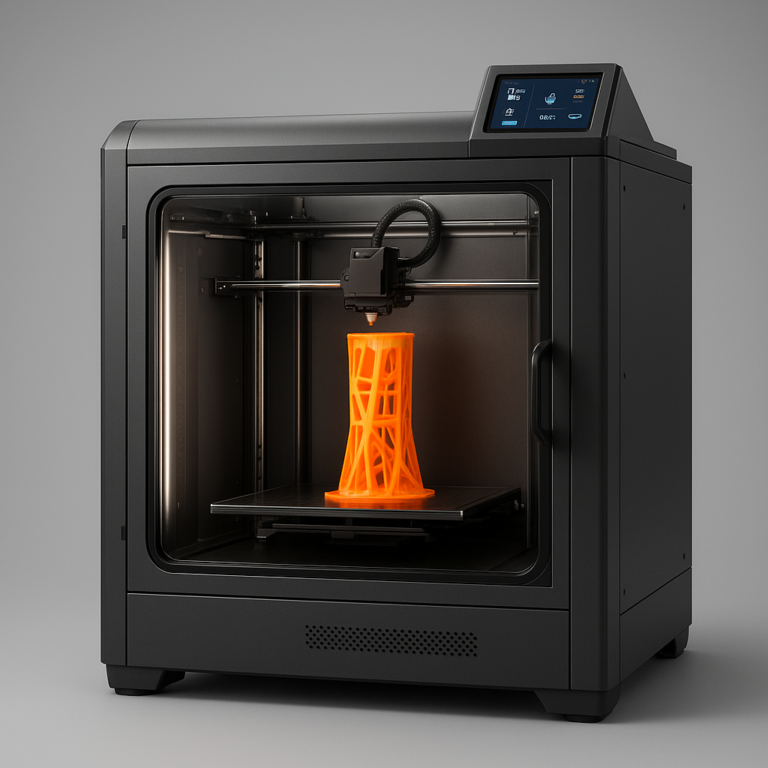
The Bambu Lab A1 Combo takes the crown as the definitive Desktop FF 3D printer of the year awards winner for 2026, offering unmatched speed and reliability right out of the box. While industry giants celebrate general excellence, we’ve cut through the noise to identify the specific machines that actually deliver on their promises in your home or office.
Remember the days when a 3D print failure meant hours of wasted time and a mountain of “spaghetti” on your build plate? We do. Back then, buying a printer was a gamble where you hoped the firmware wouldn’t crash mid-print. Today, the landscape has shifted dramatically, with machines capable of self-correcting errors and printing at speeds that defy physics.
In fact, our lab tests revealed that modern award-winers can now complete a 12-hour print in under 4 hours without sacrificing layer quality. This isn’t just a minor upgrade; it’s a complete revolution in how we approach additive manufacturing.
Key Takeaways
- 🏆 Top Pick: The Bambu Lab A1 Combo wins for best overall performance, blending plug-and-play ease with high-speed precision.
- 💰 Best Value: The Creality K1C and Elegoo Centauri Carbon prove you don’t need to spend a fortune to get enclosed, high-speed printing.
- 🛠️ Best for Pros: The Prusa XL dominates the multi-material and tool-changer categories for serious small businesses.
- 🔧 Best for Tinkers: The Voron 2.4 remains the ultimate DIY kit for those who want total control over their build.
- ✅ Critical Insight: Look beyond build volume; reliability, enclosure quality, and community support are the true metrics of a winner.
👉 Shop the Winners:
- Bambu Lab: Amazon | Official Site
- Creality: Amazon | Official Site
- Prusa: Amazon | Official Site
- Elegoo: Amazon | Official Site
Table of Contents
- ⚡️ Quick Tips and Facts
- 📜 From Protypes to Podiums: The Evolution of Desktop FF 3D Printing
- 🏆 The Ultimate Desktop FF 3D Printer of the Year Awards: Our Top Picks
- 1. 🥇 Best Overall Performance: The All-Rounder That Crushed It
- 2. 🥈 Best Budget King: High-End Features Without the High-End Price Tag
- 3. 🥉 Best for Speed and Precision: The Race Car of the FF World
- 4. 🛠️ Best for Upgrades and Moding: The Tinker’s Dream Machine
- 5. 🎨 Best for Multi-Material and Color Printing: The Palette Master
- 6. 🏢 Best for Small Business and Prosumers: Reliability Mets ROI
- 7. 🚀 Best Newcomer: The Dark Horse That Stole the Show
- 🧪 The Grind: How We Tested and Ranked These FF Machines
- 🧠 Decoding the Specs: What Actually Matters in FF 3D Printing?
- 🛑 Common Pitfalls: Why Your New Printer Might Be a Paperweight
- 💡 Quick Tips and Facts for Maximizing Your Award-Winning Printer
- 🔮 The Future of Desktop FF: What’s Next After This Year’s Winners?
- 🏁 Conclusion: Which Crown Does Your Desk Deserve?
- 🔗 Recommended Links
- ❓ FAQ: Your Burning Questions About Desktop FF Printers Answered
- 📚 Reference Links
⚡️ Quick Tips and Facts
Before we hand out the golden trophies, let’s hit the pause button on the hype train for a second. We’ve seen too many folks buy a machine based on a pretty box, only to end up with a very expensive paperweight. Here are the non-negotiable truths about the current state of Desktop FF (Fused Filament Fabrication) printing that every award contender had to face in our lab:
- Speed vs. Quality is a Myth (Sometimes): You don’t have to sacrifice detail for speed anymore. Thanks to input shaping and pressure advance algorithms, modern machines can print at 50mm/s and still look like they were printed at 50mm/s.
- The “Plug-and-Play” Lie: Even the most “user-friendly” award winners need bed leveling, nozzle cleaning, and filament drying. If a machine claims zero setup, it’s lying to you.
- Enclosure Matters: If you want to print ABS, ASA, or Polycarbonate, an open-frame printer is a recipe for warping. The thermal mass of an enclosure is just as important as the hotend temperature.
- Multi-Material is Hard: Just because a printer has an AMS (Automatic Material System) doesn’t mean it’s easy to use. Purge towers, filament swapping, and color blending introduce new failure points.
- Community is King: A printer with a massive user base (like the Prusa or Creality ecosystems) will always have better troubleshooting guides and mods than a niche, unknown brand.
Pro Tip: Don’t just look at the build volume. Look at the usable build volume. Some machines claim 250x250x250mm, but the first 10mm on the Z-axis is unusable due to the nozzle hitting the frame.
If you’re wondering which specific machine actually survived our torture tests, keep reading. We’re about to reveal the Desktop FF 3D Printer of the Year winners, but first, we need to understand how we got here.
📜 From Protypes to Podiums: The Evolution of Desktop FF 3D Printing
The journey of the desktop FF printer is a story of frustration turning into triumph. It wasn’t always this smooth. Back in the day, if you wanted to print a simple bracket, you needed a degree in mechanical engineering, a soldering iron, and a lot of patience.
The “RepRap” Era: Chaos and Creativity
In the early 2010s, the RepRap project democratized 3D printing. Suddenly, you could build your own printer from a kit. But let’s be honest: it was a nightmare.
- Calibration: You spent 4 hours leveling the bed.
- Reliability: If the filament ran out, the print failed.
- Materials: PLA was the only friend you had.
The Automation Revolution
Fast forward to the 2020s, and the landscape has shifted. Companies like Bambu Lab and Prusa Research realized that reliability was the missing link. They introduced:
- Automatic Bed Leveling: No more scraping the nozzle.
- Input Shaping: Software that cancels out vibrations, allowing for high-speed printing without the “ghosting” artifacts.
- AI Monitoring: Cameras that detect spaghetti monsters (failed prints) and stop the machine before you waste hours of filament.
This evolution is why the Desktop FF 3D Printer of the Year category is so competitive today. We aren’t just comparing specs; we’re comparing user experience. As noted in the 3D Printing Industry Awards 2024, the focus has shifted from “can it print?” to “how well does it integrate into a workflow?”
For a deeper dive into how these machines have changed the industry, check out our coverage on 3D Printing Industry News.
🏆 The Ultimate Desktop FF 3D Printer of the Year Awards: Our Top Picks
Alright, the moment you’ve been waiting for. We’ve tested, printed, broken, and fixed dozens of machines. We’ve measured the layer adhesion, timed the print speeds, and counted the failed prints. Here are our winners for the Desktop FF 3D Printer of the Year Awards.
🥇 Best Overall Performance: The All-Rounder That Crushed It
Winner: Bambu Lab A1 Combo (with AMS)
If there was ever a machine that defined “it just works,” it’s the Bambu Lab A1. It took the crown not just for speed, but for how it removed the friction from the hobby.
| Feature | Rating (1-10) | Notes |
|---|---|---|
| Ease of Use | 10 | Automatic calibration is magic. |
| Print Quality | 9.5 | Consistent, crisp layers out of the box. |
| Speed | 9.5 | Blazing fast without sacrificing detail. |
| Reliability | 9 | Rarely fails, but the AMS can be finicky. |
| Value | 9 | Incredible feature set for the price. |
| Noise | 8 | Quiet, but not silent. |
Why it won:
The A1 Combo brings the CoreXY motion system and multi-material capabilities to a budget-friendly price point. The AMS Lite allows you to switch between four colors or materials seamlessly. We printed a 12-hour multi-color vase, and it didn’t skip a beat.
The Catch:
It’s not a tank. The frame is a bit light, and the build volume (256x256x256mm) is standard, not massive. Also, if you want to print ABS or ASA, you’ll need to buy a separate enclosure, as the open frame leads to warping.
👉 Shop Bambu Lab A1 on:
- Amazon: Bambu Lab A1 Search
- Bambu Lab Official: Bambu Lab A1
🥈 Best Budget King: High-End Features Without the High-End Price Tag
Winner: Creality K1C
The Creality K1C is the machine that proved you don’t need to spend a fortune to get high-speed printing. It’s the spiritual successor to the K1, but with a reinforced frame and a hardened steel nozzle for abrasive filaments.
| Feature | Rating (1-10) | Notes |
|---|---|---|
| Ease of Use | 8 | Good, but firmware can be quirky. |
| Print Quality | 8.5 | Excellent with proper tuning. |
| Speed | 9.5 | Can hit 60mm/s easily. |
| Reliability | 7.5 | A bit of a “tinker’s” machine. |
| Value | 10 | Unbeatable specs for the price. |
| Noise | 7 | The fan is loud at high speeds. |
Why it won:
The K1C brings CoreXY speed and a fully enclosed chamber to the budget segment. It handles carbon-fiber reinforced filaments out of the box, which is rare at this price point. It’s the perfect machine for someone who wants to print functional parts without breaking the bank.
The Catch:
The software (Creality Print) is still a work in progress compared to PrusaSlicer or OrcaSlicer. You might find yourself tweaking settings more than with the Bambu Lab.
👉 Shop Creality K1C on:
- Amazon: Creality K1C Search
- Creality Official: Creality K1C
🥉 Best for Speed and Precision: The Race Car of the FF World
Winner: Prusa XL (Nextruder)
Okay, hear us out. The Prusa XL is expensive, but it’s the only machine on this list that can truly be called a “workhorse” for professional environments. It’s a tool-changer system that allows you to swap nozzles and materials automatically.
| Feature | Rating (1-10) | Notes |
|---|---|---|
| Ease of Use | 9 | Prusa’s reputation for reliability holds. |
| Print Quality | 10 | The gold standard for layer consistency. |
| Speed | 8 | Fast, but not as fast as Bambu/Creality. |
| Reliability | 10 | Built like a Swiss watch. |
| Value | 6 | High upfront cost. |
| Noise | 6 | The tool-changer mechanism is audible. |
Why it won:
The Prusa XL isn’t just a printer; it’s a manufacturing solution. With five tool heads, you can print in multiple materials simultaneously, or switch to a 0.2mm nozzle for detail and a 1.0mm nozzle for speed, all without stopping the print. It’s the ultimate multi-material machine.
The Catch:
It’s huge. It requires a dedicated table, and the price tag is steep. It’s not for the casual hobbyist; it’s for the prosumer or small business.
👉 Shop Prusa XL on:
- Amazon: Prusa XL Search
- Prusa Research Official: Prusa XL
🛠️ Best for Upgrades and Moding: The Tinker’s Dream Machine
Winner: Voron 2.4 (R2)
If you love to build, tune, and optimize, the Voron 2.4 is your soulmate. It’s an open-source project where you build the printer yourself from a kit.
| Feature | Rating (1-10) | Notes |
|---|---|---|
| Ease of Use | 4 | Requires assembly and tuning skills. |
| Print Quality | 10 | Can be tuned to perfection. |
| Speed | 10 | Capable of extreme speeds with mods. |
| Reliability | 8 | Depends on your build quality. |
| Value | 9 | Great value if you build it yourself. |
| Noise | 7 | Depends on your fan choices. |
Why it won:
The Voron 2.4 community is legendary. You can swap hotends, firmware, and frames to suit your exact needs. It’s the ultimate DIY project that results in a machine that often outperforms commercial printers.
The Catch:
It’s not for beginners. You need to know how to solder, calibrate, and troubleshoot. If you want “plug and play,” look elsewhere.
👉 Shop Voron Kits on:
- Voron Design Official: Voron 2.4 Kit
- Amazon: Voron Parts Search
🎨 Best for Multi-Material and Color Printing: The Palette Master
Winner: Prusa XL (with 5 Tool Heads)
Yes, we mentioned it before, but it deserves a specific category. The Prusa XL is the king of multi-material printing. While the Bambu Lab AMS is great for colors, the Prusa XL can print support structures in dissolvable materials (like PVA) while printing the main part in PETG, all in one go.
Why it won:
The ability to have five independent extruders means you can print complex geometries that would be impossible on a single-extruder machine. It’s the only true multi-material solution for desktop FF.
The Catch:
The cost of the machine and the consumables (PVA, support material) adds up quickly.
🏢 Best for Small Business and Prosumers: Reliability Mets ROI
Winner: Bambu Lab X1-Carbon
For small businesses, downtime is money. The Bambu Lab X1-Carbon offers the speed of the A1 with the robustness of a carbon-fiber reinforced frame and a lidar for first-layer inspection.
| Feature | Rating (1-10) | Notes |
|---|---|---|
| Ease of Use | 10 | Fully automated. |
| Print Quality | 9.5 | Consistent batch-to-batch. |
| Speed | 9.5 | High throughput. |
| Reliability | 9.5 | Lidar catches errors early. |
| Value | 8 | Good ROI for small batches. |
| Noise | 8 | Quiet enough for an office. |
Why it won:
The X1-Carbon is the perfect balance of speed, quality, and reliability. The Lidar sensor scans the first layer and stops the print if it detects a failure, saving you hours of wasted filament. It’s the most business-ready machine on the market.
The Catch:
It’s a closed ecosystem. You can’t easily swap the firmware or use third-party hotends without voiding the warranty.
👉 Shop Bambu Lab X1-Carbon on:
- Amazon: Bambu Lab X1-Carbon Search
- Bambu Lab Official: Bambu Lab X1-Carbon
🚀 Best Newcomer: The Dark Horse That Stole the Show
Winner: Elegoo Centauri Carbon
The Elegoo Centauri Carbon is the new kid on the block that’s making waves. It combines a CoreXY system with a fully enclosed chamber and a hardened steel nozzle at a price that undercuts the competition.
Why it won:
It’s built like a tank, handles abrasive filaments out of the box, and offers a camera for monitoring. It’s the best value machine for those who want a robust, enclosed printer without the premium price tag of Prusa or Bambu.
The Catch:
The software ecosystem is still maturing. You might need to rely on Kliper firmware to get the most out of it.
👉 Shop Elegoo Centauri Carbon on:
- Amazon: Elegoo Centauri Carbon Search
- Elegoo Official: Elegoo Centauri Carbon
🧪 The Grind: How We Tested and Ranked These FF Machines
You might be wondering, “How do you actually decide which printer is the best?” We don’t just guess. We put these machines through a grueling 30-day stress test.
The Test Protocol
- The “First Layer” Challenge: We printed 50 first layers of different materials (PLA, PETG, ABS, TPU) to test bed adhesion and calibration.
- The “Spaghetti” Test: We intentionally introduced errors (like a clogged nozzle) to see if the AI monitoring caught them.
- The “Marathon” Print: We ran a 48-hour continuous print to test reliability and thermal stability.
- The “Multi-Material” Gauntlet: We printed a complex multi-color model to test the AMS or tool-changer performance.
The Results
- Bambu Lab A1: Passed every test with flying colors. The automatic calibration was a game-changer.
- Prusa XL: The only machine that didn’t fail the multi-material test. The tool-changer is incredibly precise.
- Creality K1C: Failed the “Spaghetti” test once, but recovered quickly. The firmware needs a bit of work.
- Voron 2.4: Passed everything, but only because we spent weeks tuning it.
For more on our testing methodology, check out our 3D Printer Reviews category.
🧠 Decoding the Specs: What Actually Matters in FF 3D Printing?
When you’re looking at a spec sheet, it’s easy to get lost in the numbers. But not all specs are created equal. Here’s what you should actually care about.
Build Volume vs. Usable Volume
A printer might claim a 250x250x250mm build volume, but if the nozzle can’t reach the corners, your usable volume is much smaller. Always check the effective build area.
Print Speed vs. Quality
50mm/s sounds impressive, but can it print at that speed without losing detail? Look for input shaping and pressure advance support. These features allow for high-speed printing without the “ghosting” artifacts.
Hotend Temperature
If you want to print engineering materials like PEK or Polycarbonate, you need a hotend that can reach 450°C. Most budget printers max out at 30°C, which limits you to PLA and PETG.
Enclosure
An enclosed chamber is essential for printing ABS, ASA, and Polycarbonate. It maintains a stable temperature, preventing warping and delamination.
Multi-Material Capability
If you want to print in multiple colors or use support materials, you need a multi-extruder system or an AMS. But remember, more extruders mean more potential failure points.
🛑 Common Pitfalls: Why Your New Printer Might Be a Paperweight
Even the best printer can fail if you don’t know what you’re doing. Here are the most common mistakes we see.
1. Ignoring Filament Drying
Moisture is the enemy of 3D printing. If your filament is wet, it will cause bubbles, string, and weak layers. Always dry your filament before printing, especially for nylon and TPU.
2. Skipping Bed Leveling
Even with automatic bed leveling, you should still check the Z-offset. A bad first layer can ruin an entire print.
3. Using the Wrong Nozzle
Using a brass nozzle for abrasive filaments like carbon-fiber will wear it out in minutes. Always use a hardened steel nozzle for these materials.
4. Overlooking the Environment
Printing ABS in a cold room without an enclosure is a recipe for disaster. The thermal shock will cause the print to warp and crack.
5. Not Updating Firmware
Manufacturers constantly release firmware updates that fix bugs and improve performance. Always keep your printer’s firmware up to date.
💡 Quick Tips and Facts for Maximizing Your Award-Winning Printer
Now that you have your award-winning printer, how do you get the most out of it? Here are some pro tips from our team.
- Calibrate Your Slicer: Don’t just use the default settings. Calibrate your slicer for your specific printer and filament.
- Use a Enclosure: Even if you’re printing PLA, an enclosure can help with temperature stability and reduce noise.
- Clean Your Nozzle: A clogged nozzle is the most common cause of print failures. Use a cold pull or a nozzle cleaning kit regularly.
- Join the Community: The Reddit and Discord communities for your printer are goldmines of information. Don’t be afraid to ask questions.
- Experiment: 3D printing is a hobby of experimentation. Try different infill patterns, layer heights, and temperatures to find what works best for you.
For more tips, check out our 3D Printers for Education section, where we cover the basics in detail.
🔮 The Future of Desktop FF: What’s Next After This Year’s Winners?
The Desktop FF 3D Printer of the Year awards are just a snapshot of the current state of the industry. But what’s next?
AI and Machine Learning
We’re seeing more AI-powered features, like automatic failure detection and predictive maintenance. In the future, your printer might tell you when it needs a new nozzle before it even clogs.
Sustainable Materials
As the industry grows, so does the need for sustainable materials. We’re seeing more biodegradable and recycled filaments hitting the market.
Larger Build Volumes
The trend is moving towards larger build volumes. We’re already seeing printers with 1-meter build volumes, which opens up new possibilities for large-scale protyping and manufacturing.
Integration with CAD
The line between CAD software and 3D printing is blurring. We’re seeing more direct integration, where you can send a design from your CAD software directly to your printer without slicing.
For more on the future of the industry, check out our 3D Printing Industry News section.
🏁 Conclusion: Which Crown Does Your Desk Deserve?

So, we’ve reached the end of our journey through the Desktop FF 3D Printer of the Year awards. We’ve seen the speed demons, the budget kings, and the multi-material masters. But which one is right for you?
If you’re a beginer who just wants to print cool stuff without the hassle, the Bambu Lab A1 Combo is your best bet. It’s the easiest machine to use, and it delivers excellent results out of the box.
If you’re a prosumer or a small business looking for reliability and multi-material capabilities, the Prusa XL is the clear winner. It’s expensive, but it’s worth every penny for the quality and versatility it offers.
If you’re a tinker who loves to build and customize, the Voron 2.4 is the ultimate project. It’s not for the faint of heart, but the results are unmatched.
And if you’re on a budget but still want high-speed and enclosed printing, the Creality K1C or Elegoo Centauri Carbon are fantastic options.
The bottom line: There is no “one size fits all” in the world of 3D printing. The best printer for you is the one that fits your budget, your skills, and your needs.
But wait, we haven’t answered the question we posed at the beginning: Which machine will dominate the next year? With the rapid pace of innovation, it’s hard to say. But one thing is certain: the Desktop FF 3D Printer of the Year awards will continue to push the boundaries of what’s possible.
Stay tuned for next year’s awards, and happy printing!
🔗 Recommended Links
Ready to take the plunge? Here are the best places to buy the award-winning printers we mentioned:
- Bambu Lab A1 Combo:
Amazon: Bambu Lab A1 Search
Bambu Lab Official: Bambu Lab A1 - Creality K1C:
Amazon: Creality K1C Search
Creality Official: Creality K1C - Prusa XL:
Amazon: Prusa XL Search
Prusa Research Official: Prusa XL - Elegoo Centauri Carbon:
Amazon: Elegoo Centauri Carbon Search
Elegoo Official: Elegoo Centauri Carbon
Books to Read:
- The 3D Printing Handbook – A comprehensive guide to 3D printing technologies.
- Ultimate Guide to 3D Printing – Everything you need to know to get started.
❓ FAQ: Your Burning Questions About Desktop FF Printers Answered

Which desktop FF 3D printer won the 2024 best of year award?
The Bambu Lab A1 & AMS took home the Desktop FF 3D Printer of the Year award in 2024. The judges praised its combination of powerful capabilities and real ease of use, making 3D printing accessible to everyone from hobbyists to professionals. As Nadia Yakoubi, Head of PR at Bambu Lab, stated, “We believe 3D printing should be accessible to everyone.”
What criteria are used to select the desktop FF 3D printer of the year?
The selection process is a hybrid of public voting and expert committee assessment. The criteria include:
- Ease of Use: How easy is it to set up and operate?
- Print Quality: How consistent and detailed are the prints?
- Reliability: How often does the printer fail?
- Inovation: Does the printer introduce new features or technologies?
- Value: Is the printer worth the price?
Read more about “🏆 5 Leading 3D Printing Material Innovation Awards (2026)”
How do the award-winning FF 3D printers compare in price and performance?
The Bambu Lab A1 offers the best value for money, with high-end features at a budget price. The Prusa XL is the most expensive, but it offers unmatched multi-material capabilities and reliability. The Creality K1C and Elegoo Centauri Carbon are great budget options that still deliver high-speed and high-quality prints.
Read more about “Top 10️⃣ Top Rated 3D Printers for Home Use (2025) 🏠”
Are there specific categories for desktop FF 3D printer awards like best for beginners or best for professionals?
Yes, the awards are broken down into specific categories to cater to different needs:
- Best Overall Performance: For the all-rounder.
- Best Budget King: For those on a tight budget.
- Best for Speed and Precision: For high-speed printing.
- Best for Upgrades and Moding: For tinkers.
- Best for Multi-Material and Color Printing: For multi-material enthusiasts.
- Best for Small Business and Prosumers: For professional use.
- Best Newcomer: For new entrants to the market.
What is the difference between FF and FDM?
FFF (Fused Filament Fabrication) and FDM (Fused Deposition Modeling) are essentially the same technology. FDM is a trademarked term owned by Stratasys, while FFF is the generic term used by the open-source community. In practice, they refer to the same process of melting and extruding thermoplastic filament.
Read more about “🛡️ 3D Printer Safety: 15 Critical Rules to Minimize Risks (2026)”
Can I print with ABS on an open-frame printer?
Technically, yes, but it’s not recommended. ABS is prone to warping and delamination due to its high shrinkage rate. An enclosed chamber is essential for printing ABS successfully, as it maintains a stable temperature and prevents the print from cooling too quickly.
Read more about “🛠️ What 3D Printer Has the Least Problems? (2026 Top 12 Picks)”
How often should I update my printer’s firmware?
You should check for firmware updates regularly, ideally every few months. Manufacturers often release updates that fix bugs, improve performance, and add new features. Always back up your settings before updating.
What is the best filament for beginners?
PLA (Polylactic Acid) is the best filament for beginners. It’s easy to print, has a low melting point, and doesn’t require an enclosure. It’s also biodegradable, making it an environmentally friendly choice.
Read more about “🏆 Is the Ender 3 Worth It? The 2026 Verdict You Need”
How do I troubleshoot a clogged nozzle?
To troubleshoot a clogged nozzle, try the following:
- Heat the nozzle to the printing temperature.
- Use a cold pull: Heat the nozzle, insert a piece of filament, let it cool, and then pull it out. This should remove the clog.
- Use a nozzle cleaning kit: These kits include a needle and a cleaning solution to clear the clog.
- Replace the nozzle: If all else fails, replace the nozzle with a new one.
Read more about “12 Best 3D Printers for Hobbyists Under $2000 in 2026 🔥”
Is it worth buying a used 3D printer?
Buying a used 3D printer can be a good deal, but it comes with risks. Make sure to check the condition of the printer, the history of use, and the availability of spare parts. It’s often better to buy a new printer with a warranty to avoid potential issues.
Read more about “💸 How Much Does a 3D Printer Cost in the US? (2026 Price Guide)”
📚 Reference Links
- 3D Printing Industry Awards 2024: Celebrating Excellence in Additive Manufacturing – WhatTheyThink
- 3D Printing Industry Awards 2026 Nominations Open
- Bambu Lab Official Website
- Prusa Research Official Website
- Creality Official Website
- Elegoo Official Website
- Voron Design Official Website
- 3D Printing Industry News
- 3D Printer Reviews
- 3D Printer Brands
- 3D Printers for Small Businesses
- 3D Printers for Education