Support our educational content for free when you purchase through links on our site. Learn more
💸 How Much Does a 3D Printer Cost in the US? (2026 Price Guide)

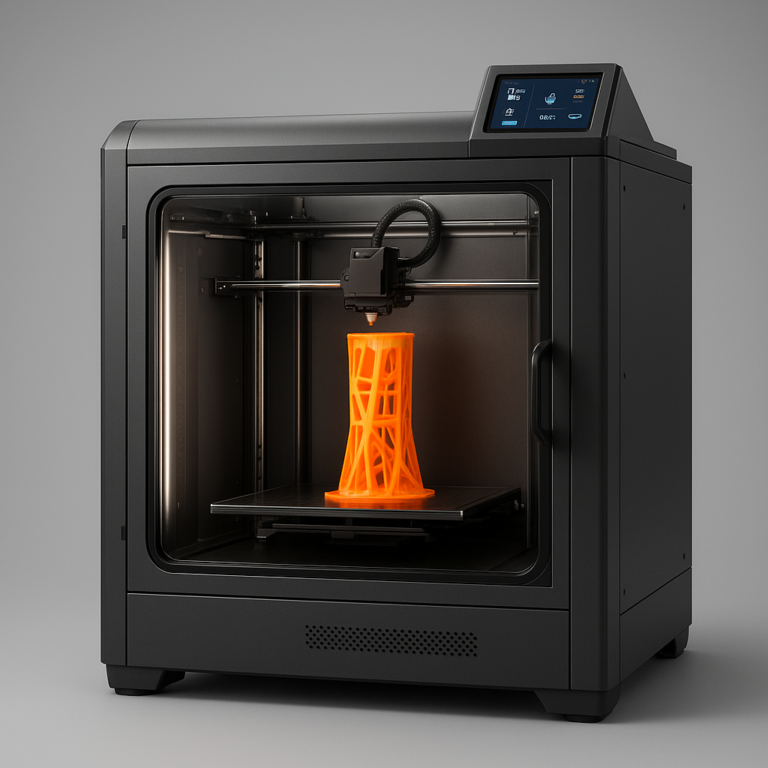
You can grab a capable 3D printer for as little as $20, but a professional machine that prints engineering-grade parts will set you back $5,0 or more. The answer to “How much does a 3D printer cost in the US?” isn’t a single number; it’s a spectrum defined by your tolerance for tinkering versus your need for reliability.
We once watched a friend buy a $180 printer, only to spend three weekends troubleshooting bed adhesion issues while his neighbor’s $1,20 machine printed a full week’s worth of parts without a hicup. That’s the hidden math of 3D printing: time is money.
The market has shifted dramatically in 2026. What used to require a PhD in mechanical engineering now works out of the box, but the “cheap” options often hide significant maintenance costs. Whether you are a hobbyist or a business owner, understanding the Total Cost of Ownership is the only way to avoid sticker shock.
Key Takeaways
- Entry-Level Reality: You can start printing for $20–$50, but expect to invest time in assembly and calibration.
- The Sweet Spot: Most hobbyists and small businesses find the best value in the $50–$2,0 range, where reliability and speed skyrocket.
- Professional Investment: Industrial-grade machines start around $4,0 and can exceed $10,0, offering materials and precision that consumer models simply cannot match.
- Hidden Costs: Always budget an extra 20–30% for filament, resin, nozzles, and potential repairs.
- Top Recommendation: For beginners, the Bambu Lab A1 Mini offers the best balance of price and ease of use, while the Prusa MK4 remains the gold standard for long-term reliability.
👉 Shop Top Categories:
- Best Budget Printers: Amazon | Bambu Lab
- Best Enthusiast Printers: Amazon | Prusa Research
- Professional Solutions: Formlabs | Ultimaker
Table of Contents
- ⚡️ Quick Tips and Facts
- 🕰️ A Brief History of 3D Printer Pricing in the US
- 💸 The Real Cost Breakdown: It’s Not Just the Sticker Price
- 🛠️ Budget-Friendly Entry-Level 3D Printers ($20–$1,0)
- 🚀 Mid-Range Enthusiast Machines ($1,0–$4,0)
- 🏭 Professional & Performance 3D Printers ($4,0–$20,0)
- 🏢 Industrial & Enterprise 3D Printing Solutions ($20,0–$10,0+)
- 🧵 Material Matters: How Filament, Resin, and Powder Affect Your Wallet
- 🔧 Hidden Costs: Maintenance, Upgrades, and the “Tinkering Tax”
- 🆚 FDM vs. SLA vs. SLS: Which Technology Fits Your Budget?
- 📦 Shipping, Taxes, and Import Duties: The US Buyer’s Reality Check
- 🛒 Where to Buy in the US: Retailers, Direct Sales, and Second-Hand Markets
- 🤔 One of the Most Common Questions: “How Much Does a 3D Printer Cost?”
- 📊 GUIDE TO 3D PRINTER PRICING TIERS
- 🎯 Searching for a Professional 3D Printer That Is High-Performance, Easy to Use, and Reliable?
- 💡 Conclusion
- 🔗 Recommended Links
- ❓ FAQ
- 📚 Reference Links
Quick Tips and Facts
Before you dive headfirst into the rabbit hole of 3D printing, let’s hit the pause button and grab a few golden nugets of wisdom. We’ve seen too many folks burn their credit cards on a machine that ended up gathering dust because they didn’t ask the right questions first.
- The “Sticker Shock” is Real: The price tag on the box is just the entry fee. Filament, resin, nozzles, and electricity will eat into your budget faster than you think.
- Time is Money: A $20 printer that fails 50% of the time is more expensive than a $1,0 printer that works 9% of the time. Reliability often trumps raw specs for beginners.
- Safety First: 3D printers get hot and emit fumes. Before you even unbox your new toy, read our guide on 🛡️ 3D Printer Safety: 15 Critical Rules to Minimize Risks.
- The “Free” Printer Myth: You can find used printers for pennies, but if you don’t know how to fix them, you’re buying a paperweight. Knowledge is the most valuable currency here.
- Technology Matters: FDM (filament) is generally cheaper to start; SLA (resin) is cheaper for high-detail miniatures but messier; SLS (powder) is the industrial heavyweight.
A Brief History of 3D Printer Pricing in the US

Remember the 1980s? Back then, if you wanted a 3D printer, you needed a small fortune and a PhD in mechanical engineering. The first commercial 3D printer, the SLA-1 by 3D Systems, cost around $10,0 (adjusted for inflation, that’s a cool $250k+ today!). It was strictly for the elite.
Fast forward to the 20s, and the RepRap project changed everything. This open-source initiative aimed to create a self-replicating 3D printer. Suddenly, the barrier to entry plummeted. By 2010, you could build a printer for a few hundred dollars.
The real game-changer hit in the mid-2010s when patents on FDM technology expired. This sparked an explosion of innovation, particularly in China, driving prices down to the $20-$40 range for decent machines. Today, in 2026, we are in a “more for less” era. You can get AI-assisted, multi-color printing capabilities for the price of a mid-range laptop.
But here’s the twist: Has the cost of ownership actually gone down? While the hardware is cheaper, the demand for high-performance materials (like carbon fiber or PEEK) and the need for enclosed, heated chambers have kept the effective cost for serious users surprisingly high.
The Real Cost Breakdown: It’s Not Just the Sticker Price
You see a printer listed for $30, you pull out your wallet, and… wait a minute. That’s not the whole story. We call this the “Tinkering Tax.”
When we at Best 3D Printer™ evaluate a machine, we look at the Total Cost of Ownership (TCO). Let’s break it down:
- The Hardware: The machine itself.
- Consumables: Filament, resin, build plates, nozzles, glue sticks.
- Post-Processing: Isopropyl alcohol (for resin), sandpaper, paint, curing stations.
- Maintenance: Replacement parts (bowden tubes, fans, belts) that wear out.
- Electricity: A heated chamber printer can draw as much power as a space heater.
- Your Time: The most expensive resource. If you spend 10 hours fixing a $20 printer, you’ve spent more than buying a $1,0 one that just works.
Pro Tip: Always budget an extra 20-30% on top of the printer cost for your first year of operation.
Budget-Friendly Entry-Level 3D Printers ($20–$1,50)
This is the “Wild West” of 3D printing. It’s where dreams are born and sometimes, where credit card bills are born. In this tier, you are trading convenience for cost. You might spend more time tuning the printer than printing.
What to Expect
- Assembly: Often requires some assembly (though many are “semi-asembled” now).
- Features: Basic auto-leveling, open frame (usually), PLA/ABS capability.
- Reliability: Hit or miss. You need to be handy with a screwdriver.
Top Contenders in the Budget Tier
| Feature | Creality Ender 3 V3 SE | Bambu Lab A1 Mini | Anycubic Kobra 2 Neo |
|---|---|---|---|
| Build Volume | 20 x 20 x 250 mm | 180 x 180 x 180 mm | 20 x 20 x 250 mm |
| Auto-Leveling | CR-Touch (Single point) | Full Auto (AI assisted) | LeviQ 3.0 (Multi-point) |
| Speed | Up to 250 mm/s | Up to 50 mm/s | Up to 250 mm/s |
| Assembly Level | Partial | Fully Asembled | Partial |
| Best For | Tinkers on a budget | Beginners wanting ease | Fast printing on a budget |
Creality Ender 3 V3 SE
The Ender 3 series has been the “Toyota Corolla” of 3D printing for a decade. The V3 SE is the latest iteration, finally adding auto-leveling and a direct drive extruder.
- Pros: Massive community support, cheap parts, reliable for the price.
- Cons: Still requires some tinkering, open frame limits material choice (no ABS/ASA without mods).
- Verdict: Great if you want to learn how a printer works.
Bambu Lab A1 Mini
Bambu Lab has disrupted the market with their “plug-and-play” philosophy. The A1 Mini is their entry-level beast.
- Pros: Incredible speed, AI camera for failure detection, fully assembled, multi-color capable (with AMS Lite).
- Cons: Smaller build volume, proprietary ecosystem (though improving).
- Verdict: The best “out of the box” experience for beginners.
👉 CHECK PRICE on:
- Creality Ender 3 V3 SE: Amazon | Creality Official
- Bambu Lab A1 Mini: Amazon | Bambu Lab Official
- Anycubic Kobra 2 Neo: Amazon | Anycubic Official
Mid-Range Enthusiast Machines ($1,0–$4,0)
You’ve graduated from the “will it print?” phase. Now you want consistency, speed, and material versatility. This is the sweet spot for serious hobbyists, small businesses, and schools.
What to Expect
- Build Volume: Larger beds (30mm+).
- Features: Dual extruders (for multi-material), enclosed chambers, high-temp hotends.
- Reliability: High. These machines are built to run 24/7.
Bambu Lab X1-Carbon
This machine is the current darling of the community. It combines speed, precision, and AI monitoring.
-
Rating Table:
Design: 9/10 (Slek, enclosed, modern)
Functionality: 10/10 (Multi-color, auto-calibration)
Ease of Use: 10/10 (App integration is seamless)
Value: 8/10 (High price, but saves time)
Durability: 9/10 (Solid build, but proprietary parts can be pricey) -
Analysis: The X1-Carbon handles everything from PLA to Carbon Fiber reinforced filaments with ease. The LiDAR scanner calibrates flow and vibration compensation automatically. It’s expensive, but if you value your time, it pays for itself.
Prusa MK4
The Prusa is the “gold standard” for reliability and open-source philosophy.
-
Rating Table:
Design: 8/10 (Industrial, utilitarian)
Functionality: 9/10 (Nextruder, input shaping)
Ease of Use: 9/10 (Great firmware, but less “smart” than Bambu)
Value: 9/10 (Excellent support, long lifespan)
Durability: 10/10 (Built like a tank) -
Analysis: Prusa doesn’t rely on AI gimmicks; it relies on mechanical perfection. The MK4 features a new Nextruder and improved input shaping. It’s the choice for those who want a machine that will last a decade and can be repaired with standard tools.
👉 CHECK PRICE on:
- Bambu Lab X1-Carbon: Amazon | Bambu Lab Official
- Prusa MK4: Amazon | Prusa Research Official
Professional & Performance 3D Printers ($4,0–$20,0)
This is where the rubber meets the road. You aren’t printing toys anymore; you’re printing functional end-use parts, jigs, fixtures, and prototypes that need to survive real-world stress.
What to Expect
- Materials: PEEK, PEKK, ULTEM, Carbon Fiber, Glass Fiber.
- Chamber Temp: Heated chambers up to 10°C+ to prevent warping.
- Precision: Micron-level accuracy and repeatability.
Fusion3 F410
As mentioned in our competitor analysis, Fusion3 offers some of the best value in this tier.
- Key Specs: 30x30x30mm build volume, 450°C hotend, 10°C chamber.
- Why it wins: It handles high-temp engineering materials without breaking the bank. It’s designed for durability and IP security (no mandatory cloud).
Ultimaker S5 Pro Bundle
The industry veteran for professional protyping.
- Key Specs: Dual extrusion (soluble supports), large build volume, extensive material library.
- Why it wins: The dual extrusion system allows for complex geometries using PVA or Breakaway supports. It’s the go-to for engineering firms.
👉 CHECK PRICE on:
- Fusion3 F410: Fusion3 Official
- Ultimaker S5: Ultimaker Official
Industrial & Enterprise 3D Printing Solutions ($20,0–$10,0+)
We’ve entered the realm of manufacturing. These machines are not for your garage; they are for the factory floor. They produce parts in volume, with material properties that rival injection molding.
What to Expect
- Technology: SLS (Selective Laser Sintering), Metal DMLS, Large Format FDM.
- Throughput: Production-grade speed and reliability.
- Support: Dedicated account managers, on-site training, service contracts.
Formlabs Fuse 1+ 30W
SLS technology used to be the domain of million-dollar machines. Formlabs brought it down to earth.
- Technology: SLS (Nylon powder).
- Advantage: No support structures needed. You can nest parts in the powder bed, maximizing volume.
- Cost: The printer is ~$20k, but the complete setup (including depowdering station) is around $60k.
Stratasys F90
The giant of large-format FDM.
- Technology: FDM with high-temp materials.
- Use Case: Printing large automotive molds, aerospace ducts, and boat hulls.
- Cost: Can easily exceed $10k depending on configuration.
👉 CHECK PRICE on:
- Formlabs Fuse 1+: Formlabs Official
- Stratasys F90: Stratasys Official
Material Matters: How Filament, Resin, and Powder Affect Your Wallet
The printer is just the engine; the material is the fuel. And just like cars, some fuels are pricier than others.
- PLA (FDM): The cheapest. ~$20-$30/kg. Easy to print, but not durable.
- ABS/ASA (FDM): ~$25-$40/kg. Needs an enclosure, emits fumes.
- PETG (FDM): ~$25-$45/kg. The happy medium of strength and ease.
- Engineering Filaments (Carbon Fiber, Nylon, PEEK): $50-$20+/kg. PEEK can cost $50/kg.
- Resin (SLA): ~$80-$250/L. Standard resins are cheap; engineering resins (tough, flexible, high-temp) are expensive.
- SLS Powder: ~$10-$30/kg. Unfused powder can be reused, lowering the effective cost.
Did you know? A single failed print of a high-temp material can cost you $50 in wasted material and electricity. This is why reliability in the $4k+ range is so critical.
Hidden Costs: Maintenance, Upgrades, and the “Tinkering Tax”
Let’s talk about the elephant in the room: Maintenance.
- Nozzles: Brass nozzles wear out in 50-10 hours with abrasive filaments. Steel nozzles last longer but cost more.
- Belts and Motors: Over time, belts stretch, and motors lose torque.
- Build Plates: PEI sheets get scratched; glass breaks; magnets lose strength.
- Software: Some brands lock you into their ecosystem, forcing you to buy their proprietary filament or software subscriptions.
The “Tinkering Tax” Calculation:
If you spend 2 hours a week fixing a $30 printer, and you value your time at $20/hour, that’s $1,760 a year in labor. Suddenly, a $2,0 printer that requires zero maintenance looks like a bargain.
FDM vs. SLA vs. SLS: Which Technology Fits Your Budget?
Choosing the right technology is like choosing a vehicle. Do you need a pickup truck (FDM), a sports car (SLA), or a semi-truck (SLS)?
| Technology | Best For | Startup Cost | Material Cost | Post-Processing |
|---|---|---|---|---|
| FDM | Functional parts, large objects, protyping | Low ($20+) | Low | Low (Support removal) |
| SLA (Resin) | Miniatures, jewelry, dental, high detail | Medium ($20+) | Medium | High (Washing/Curing) |
| SLS | Functional parts, no supports, batch production | High ($20k+) | Medium | Medium (Depowdering) |
- FDM: The workhorse. If you need a bracket for your car, go FDM.
- SLA: The artist. If you need a detailed miniature for D&D, go SLA.
- SLS: The manufacturer. If you need 10 identical, strong parts, go SLS.
Shipping, Taxes, and Import Duties: The US Buyer’s Reality Check
Buying from overseas (China) can save you 20-30%, but be careful.
- Shipping: Large printers are heavy. Shipping can cost $10-$30.
- Duties: Depending on the trade agreements, you might face import duties.
- Warranty: If a Chinese printer breaks, sending it back for repair is a nightmare. Buy local if you value support.
Where to Buy in the US: Retailers, Direct Sales, and Second-Hand Markets
- Direct from Manufacturer: Best for warranty and support (e.g., Prusa, Bambu Lab, Formlabs).
- Authorized Resellers: Often have bundles (printer + filament + tools).
- Amazon: Good for entry-level, but check seller ratings.
- Second-Hand (eBay/Facebook Marketplace): High risk, high reward. Only buy if you know the machine well.
One of the Most Common Questions: “How Much Does a 3D Printer Cost?”
We get this question every day. The answer is: It depends.
- For a kid learning to print: $20-$40.
- For a hobbyist making cool stuff: $50-$1,50.
- For a small business making parts: $2,0-$5,0.
- For a factory: $20,0+.
But remember the video perspective we mentioned earlier? The Bambu Lab A1 Mini at ~$20 is changing the game for beginners. It proves you don’t need to spend a fortune to get great results.
GUIDE TO 3D PRINTER PRICING TIERS
Let’s summarize the tiers with a clear roadmap:
- Entry-Level ($20-$50): Great for learning, but expect to tinker.
- Hobbyist ($50-$1,50): The sweet spot for most. Good balance of features and price.
- Prosumer ($1,50-$4,0): High reliability, multi-material, large volume.
- Professional ($4,0-$20,0): Engineering materials, industrial reliability.
- Industrial ($20,0+): Mass production, metal printing, SLS.
Searching for a Professional 3D Printer That Is High-Performance, Easy to Use, and Reliable?
If you are looking for that perfect balance, look at the Bambu Lab X1-Carbon or the Prusa MK4. They offer the performance of industrial machines with the ease of use of a consumer appliance.
- Bambu Lab: Focuses on speed and AI.
- Prusa: Focuses on open-source reliability and support.
Both are excellent choices, but they cater to slightly different philosophies.
Conclusion

So, how much does a 3D printer cost in the US? The answer ranges from a pocket change $20 to a $10,0 industrial beast. But the real cost isn’t just the sticker price; it’s the time, materials, and reliability you get in return.
If you are a beginner, don’t be afraid to start small. The Bambu Lab A1 Mini or Creality Ender 3 V3 SE are fantastic entry points. If you are a professional, investing in a Prusa MK4 or Bambu Lab X1-Carbon will save you hours of frustration and money in the long run.
Our Final Recommendation:
- Beginers: Go with Bambu Lab A1 Mini for ease of use.
- Hobbyists: Prusa MK4 for longevity and support.
- Professionals: Fusion3 F410 or Ultimaker S5 for engineering materials.
Remember, the best 3D printer is the one that actually gets used. Don’t let the fear of cost stop you from creating.
Recommended Links
👉 Shop Top 3D Printers:
- Bambu Lab A1 Mini: Amazon | Bambu Lab Official
- Prusa MK4: Amazon | Prusa Research Official
- Creality Ender 3 V3 SE: Amazon | Creality Official
- Formlabs Fuse 1+: Formlabs Official
Recommended Books:
- The Ultimate Guide to 3D Printing on Amazon
- 3D Printing: The Next Industrial Revolution on Amazon
FAQ

What are the best budget 3D printers available in the US market?
The Bambu Lab A1 Mini and Creality Ender 3 V3 SE are currently the top contenders. They offer incredible value, with the A1 Mini providing a “plug-and-play” experience and the Ender 3 offering a massive community for support.
Read more about “🏆 Is the Ender 3 Worth It? The 2026 Verdict You Need”
How do professional 3D printers compare in cost to consumer models?
Professional models (like the Prusa MK4 or Bambu Lab X1-Carbon) cost 3-5x more than consumer models but offer reliability, speed, and material versatility that consumer models lack. They are designed to run 24/7 without failure.
Read more about “Unlock Creation: 7 Best Budget 3D Printers (2026) 🚀”
What factors influence the price of 3D printers in the US?
Key factors include build volume, motion system (CoreXY vs. Cartesian), enclosure type, hotend temperature, and brand support. Proprietary ecosystems can also drive up costs.
Which 3D printers have won awards for best value in the US market?
The Bambu Lab A1 Mini and Prusa MK4 are frequently cited as award-winers for value. The A1 Mini revolutionized the entry-level market, while the Prusa MK4 continues the legacy of reliability.
How do professional 3D printer prices compare to consumer models?
(See answer above). Professional models are an investment in time savings and part quality.
Read more about “What Is the Best Brand for 3D Printers? Top 11 Picks for 2026 🚀”
Are there affordable 3D printers with award-winning features?
Yes, the Bambu Lab A1 Mini brings features like AI monitoring and high-speed printing to the sub-$30 price point, a feature that was previously exclusive to $2,0+ machines.
What factors affect the price of 3D printers in the US?
(See answer above).
What are the top-rated 3D printers in different price ranges, from budget-friendly to high-end, and what are their features?
- Budget: Bambu Lab A1 Mini (AI, speed).
- Mid-Range: Prusa MK4 (Reliability, open-source).
- High-End: Fusion3 F410 (High-temp materials, large volume).
Are there any affordable 3D printer options available for hobbyists and enthusiasts in the US?
Absolutely. The Anycubic Kobra 2 Neo and Creality Ender 3 V3 SE are excellent choices for hobbyists who want to learn without breaking the bank.
What factors affect the cost of a 3D printer and how can I choose the right one for my budget?
Consider your intended use (hobby vs. business), material needs (PLA vs. PEEK), and time availability (tinkering vs. ready-to-print).
What are the best 3D printers for beginners and their prices in the US?
The Bambu Lab A1 Mini ($20) is the top recommendation for beginners due to its ease of use. The Creality Ender 3 V3 SE ($20) is a close second for those who want to learn the mechanics.
What is the average price for a personal as well as commercial 3D printer?
Personal printers average $30-$1,50. Commercial printers start around $2,0 and can go up to $10,0+ for industrial systems.
Read more about “🚀 How to Choose the Best 3D Printer for Beginners in 2026 (Top 15 Picks)”
Is it expensive to 3D print at home?
Not necessarily. Electricity and filament costs are low for occasional use. However, if you print daily, material costs can add up.
Read more about “🛡️ 3D Printer Safety: 15 Critical Rules to Minimize Risks (2026)”
How much do 3D printers normally cost?
They range from $20 to $10,0+, depending on the technology and intended use.
Is it expensive to print on a 3D printer?
The cost per part is generally low (cents to dollars), but the initial investment and maintenance can be significant.
Read more about “🏆 5 Leading 3D Printing Material Innovation Awards (2026)”
What is the average cost of a 3D printer?
For a home user, the average is around $50. For a small business, it’s around $3,0.
Read more about “💰 Can You Make Money with a 3D Printer? 15 Real Ways (2026)”
How much money is the cheapest 3D printer?
You can find functional printers for $150-$20, but they often require significant assembly and tuning.
Read more about “🏆 7 Best 3D Printers for Beginners (2026)”
What is the cheapest way to 3D print?
Buying a used FDM printer (like an older Ender 3) and learning to repair it is the cheapest way, but it requires technical skills.
Read more about “🏆 Which Type of 3D Printer is Best? The 2026 Ultimate Guide”
How much is a 3D printing machine in USA?
Prices vary widely, from $20 for entry-level to $10,0+ for industrial machines.
Read more about “What Type of 3D Printer is Anycubic? … 🖨️”
Reference Links
- Formlabs: How Much Does a 3D Printer Cost?
- Fusion3: Professional 3D Printers
- Bambu Lab Official Site
- Prusa Research Official Site
- Creality Official Site
- Ultimaker Official Site
- Anycubic Official Site
- Best 3D Printer Reviews
- Best 3D Printer Brands
- Best 3D Printers for Small Businesses
- Best 3D Printers for Education