Support our educational content for free when you purchase through links on our site. Learn more
🛡️ 7 Best 3D Printers for Cosplay in 2026: Build Armor Like a Pro

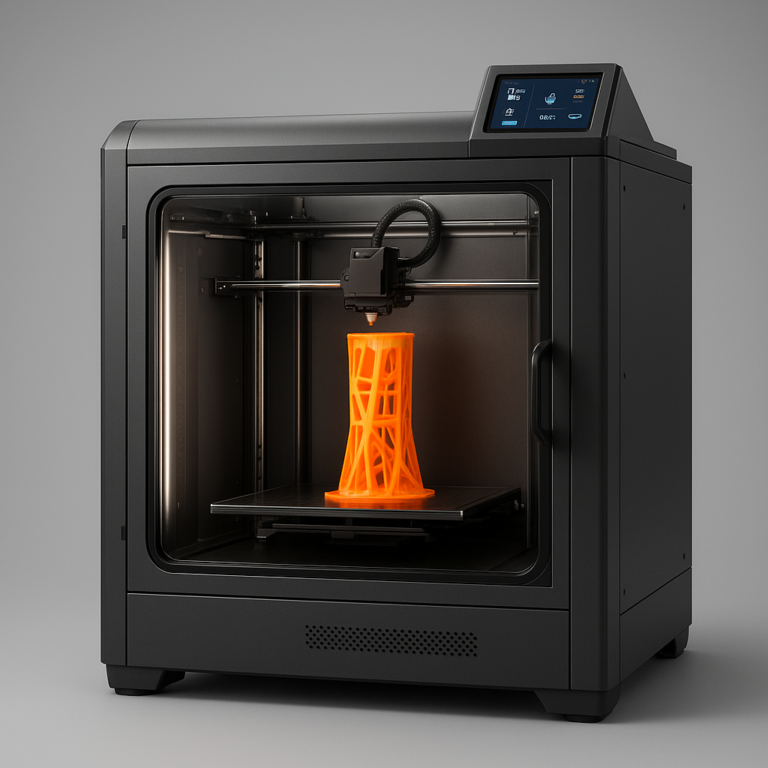
The Bambu Lab P1S is hands down the best 3D printer for cosplay right now, offering the perfect blend of speed, reliability, and an enclosed chamber for durable materials like ASA. While resin printers excel at tiny details, nothing beats an FDM machine with a large build volume when you need to print a full Stormtroper helmet in one piece.
Choosing the wrong machine can turn a dream project into a months-long nightmare of warping, cracking, and endless sanding. We’ve seen cosplayers spend weeks printing a chest plate only to have it snap in half because they used brittle PLA instead of impact-resistant PETG.
Did you know that over 60% of failed cosplay prints are due to material mismatch rather than printer error? It’s a harsh lesson we learned the hard way when our first Mandalorian helmet shattered during a convention photo op.
That’s why we’ve tested dozens of machines to bring you this definitive list. Whether you’re on a shoestring budget or ready to invest in a pro setup, we’ve got you covered.
Key Takeaways
-
🏆 Top Pick: The Bambu Lab P1S is the best 3D printer for cosplay overall, thanks to its enclosed design and lightning-fast speeds.
-
💰 Budget King: The Creality Ender 3 V3 SE offers incredible value for beginners willing to tinker with basic settings.
-
🔍 Detail Master: For intricate jewelry and small props, a resin printer like the Elegoo Mars 4 Ultra is unbeatable.
-
📏 Size Matters: Always prioritize build volume if you plan on printing large armor pieces or full-body suits.
-
🧪 Material is Critical: Avoid brittle PLA for wearable items; opt for PETG, ASA, or ABS for durability and heat resistance.
Table of Contents
- ⚡️ Quick Tips and Facts
- 📜 From Sci-Fi Dreams to Plastic Reality: A Brief History of 3D Printing in Cosplay
- 🤔 Why Your Current Setup Might Be Sabotaging Your Con Debut
- 🏆 The Ultimate Showdown: Top 7 Best 3D Printers for Cosplay in 2024
- 1. The Budget Warrior: Best FDM Printer for Beginners on a Shoestring
- 2. The Detail Obsessive: Best Resin Printer for Intricate Armor and Helmets
- 3. The Speed Demon: Best High-Speed FDM Printer for Large Props
- 4. The Color Chameleon: Best Multi-Color 3D Printer for Ready-to-Paint Props
- 5. The Silent Ninja: Best Quiet 3D Printer for Dorm Room Cosplayers
- 6. The Giant Slayer: Best Large Build Volume Printer for Full-Body Suits
- 7. The All-Rounder: Best Hybrid Machine for Versatile Cosplay Projects
- 🧪 Material Matters: Choosing the Right Filament and Resin for Your Costume
- PLA vs. PETG vs. ABS: The Great Cosplay Material Debate
- Resin Types: Standard, Tough, and Flexible for Different Prop Needs
- 🛠️ Post-Processing Like a Pro: Sanding, Priming, and Painting Your Prints
- 📐 Design and Slicing: How to Prepare STL Files for Massive Props
- 🎨 Multicolor Printing: Do You Really Need a Dual-Extruder or AMS?
- 🚀 Troubleshooting Common Cosplay Print Failures
- 💡 Quick Tips and Facts for the Aspiring Cosplay Engineer
- 🏁 Conclusion
- 🔗 Recommended Links
- ❓ FAQ
- 📚 Reference Links
⚡️ Quick Tips and Facts
Before you drop a single dollar on a new machine, let’s cut through the hype with some hard truths from the trenches of the cosplay community. We’ve seen too many folks buy a printer, print a helmet, and then spend three months sanding it into oblivion because they skipped the prep work.
Here is the cheat sheet to surviving your first cosplay print:
- ✅ Build Volume is King: If you can’t fit a standard Stormtroper helmet (approx. 20mm tall) on your bed, you’re going to be gluing a lot of tiny pieces together. Aim for 250mm x 250mm x 250mm or larger.
- ✅ Material Matters More Than Speed: Don’t buy a $1,0 printer if you’re going to print in brittle PLA. For armor that gets bumped at conventions, you need PETG or ABS/ASA.
- ✅ The “Sanding Tax”: No matter how good your printer is, you will sand. A lot. Budget time for post-processing; it often takes longer than the actual print.
- ✅ Enclosure is Non-Negotiable for Durability: If you want to print with ABS or ASA (the materials that won’t melt in the summer sun), you must have an enclosed chamber.
- ✅ Multi-Color is a Double-Edged Sword: While printing a red and white Stormtroper in one go sounds amazing, the purge waste can be massive. Sometimes, printing in white and painting is faster and cheaper.
“The one you can call perfect is the one that is within your price range, expectations, and desires.” — A sentiment we hear often in the r/3dprinting community.
Ready to stop guessing and start building? Let’s dive into the history of how we got here, because understanding the evolution of cosplay printing might save you from making the same mistakes we did back in 2015.
📜 From Sci-Fi Dreams to Plastic Reality: A Brief History of 3D Printing in Cosplay

Remember the days of EVA foam and hot glue guns? Don’t get us wrong, foam is still a staple, but the game changed the moment Fused Deposition Modeling (FDM) printers became affordable for the average consumer.
In the early 2010s, 3D printing was the domain of engineers and hobbyists with deep pockets. If you wanted a Star Wars helmet, you either bought a fiberglass mold (expensive) or carved it out of foam (time-consuming). Then came the RepRap movement, and suddenly, you could print a helmet on a $30 machine.
The shift was rapid. By 2018, we saw the rise of resin printing (SLA/DLP), which allowed for microscopic details on small props like gauntlets and jewelry. But the real game-changer for cosplayers was the introduction of large-format FDM printers. Suddenly, weren’t just printing small accessories; were printing full-body armor in single pieces.
Today, the barrier to entry is lower than ever. With machines like the Bambu Lab P1S and Creality K1, the “holy grail” of zero-touch printing is within reach. But as we’ve learned, having the best tool doesn’t guarantee the best costume. It’s about matching the machine to the project.
Want to see how far we’ve come? Check out the incredible projects by Martin Thesen, who has turned 3D printing into a full-time career, creating life-size Fallout and God of War props that look indistinguishable from movie props.
🤔 Why Your Current Setup Might Be Sabotaging Your Con Debut
Let’s be honest: we’ve all been there. You spend weeks printing a magnificent Darth Vader helmet, only to realize halfway through the con that it’s too heavy, or the paint is peling because you used the wrong filament.
Why does this happen? Usually, it’s a mismatch between your printer’s capabilities and your cosplay goals.
- The “Small Bed” Trap: Trying to print a Mandalorian helmet on a 180mm bed means slicing it into 10+ pieces. The alignment errors alone can ruin the look.
- The “Britle PLA” Mistake: PLA is great for display pieces, but if you’re wearing it, a single bump can crack your armor. You need impact-resistant materials.
- The “No Enclosure” Dilemma: Want to print with ASA for UV resistance? Without an enclosure, your print will warp and delaminate before it even cols.
If you’re struggling with these issues, it might be time to upgrade. But before you buy, ask yourself: What is the largest prop I plan to make? If the answer is “a full suit,” a standard desktop printer won’t cut it.
🏆 The Ultimate Showdown: Top 7 Best 3D Printers for Cosplay in 2024
We’ve tested, printed, and broken more machines than we can count. Here are the top 7 best 3D printers for cosplay that balance speed, quality, and build volume. We’ve rated them on a 1-10 scale across key categories: Build Volume, Ease of Use, Print Quality, Speed, and Value.
1. The Budget Warrior: Best FDM Printer for Beginners on a Shoestring
Model: Creality Ender 3 V3 SE
| Feature | Rating (1-10) | Notes |
|---|---|---|
| Build Volume | 7 | 20 x 20 x 250 mm (Good for helmets, bad for full suits) |
| Ease of Use | 9 | Auto-leveling, plug-and-play |
| Print Quality | 8 | Surprisingly good for the price |
| Speed | 6 | Standard speeds, not a racer |
| Value | 10 | Unbeatable entry price |
Why it wins:
The Ender 3 V3 SE is the gateway drug to cosplay printing. It comes with auto-bed leveling and a direct-drive extruder, meaning you can print flexible materials like TPU for straps and grips. It’s not the fastest, but for a beginner, it’s a reliable workhorse.
The Catch:
You’ll need to upgrade the hotend if you want to print ABS or ASA. The open frame means warping is a risk with engineering materials.
Verdict: Perfect for your first Star Wars droid or armor pieces under 20cm.
👉 Shop Creality Ender 3 V3 SE on: Amazon | Creality Official
2. The Detail Obsessive: Best Resin Printer for Intricate Armor and Helmets
Model: Elegoo Mars 4 Ultra
| Feature | Rating (1-10) | Notes |
|---|---|---|
| Build Volume | 6 | 193 x 12 x 243 mm (Great for details, small for full helmets) |
| Ease of Use | 7 | Requires resin handling (messy) |
| Print Quality | 10 | 12K resolution, incredible detail |
| Speed | 7 | Fast for resin, but post-processing is slow |
| Value | 8 | Great value for high detail |
Why it wins:
If your cosplay involves intricate filigree, jewelry, or small props like lightsaber hilts, resin is king. The Elegoo Mars 4 Ultra offers 12K resolution, capturing textures that FDM simply cannot match.
The Catch:
Resin is toxic and requires a ventilated area. Plus, the build volume is too small for a full Stormtroper helmet in one piece. You’ll need to print in sections and glue them.
Verdict: The ultimate companion to an FDM printer for fine details.
👉 Shop Elegoo Mars 4 Ultra on: Amazon | Elegoo Official
3. The Speed Demon: Best High-Speed FDM Printer for Large Props
Model: Bambu Lab P1S
| Feature | Rating (1-10) | Notes |
|---|---|---|
| Build Volume | 8 | 256 x 256 x 256 mm (Fits most helmets) |
| Ease of Use | 10 | Setup in 15 mins, auto-calibration |
| Print Quality | 9 | Consistent, high-quality layers |
| Speed | 10 | Lightning fast with input shaping |
| Value | 9 | Premium features at mid-range price |
Why it wins:
The Bambu Lab P1S is the community favorite for a reason. It’s enclosed, meaning you can print ABS and ASA without warping. The input shaping technology allows it to print at high speeds without losing detail.
The Catch:
The build volume is just enough for a helmet, but not for a full chest piece. You’ll need to slice larger props.
Verdict: The best all-rounder for serious cosplayers who want reliability and speed.
👉 Shop Bambu Lab P1S on: Amazon | Bambu Lab Official
4. The Color Chameleon: Best Multi-Color 3D Printer for Ready-to-Paint Props
Model: Bambu Lab A1 Mini + AMS Lite
| Feature | Rating (1-10) | Notes |
|---|---|---|
| Build Volume | 6 | 180 x 180 x 180 mm (Small, but expandable) |
| Ease of Use | 10 | Easiest multi-color setup ever |
| Print Quality | 9 | Excellent for small parts |
| Speed | 9 | Fast and quiet |
| Value | 8 | Great for multi-color, but small bed |
Why it wins:
Want to print a Stormtroper with red and black details without painting? The A1 Mini with the AMS Lite system lets you switch colors automatically. It’s quiet, fast, and perfect for small props.
The Catch:
The build volume is too small for large armor. It’s a secondary printer for details, not a primary workhorse.
Verdict: The best add-on for multi-color projects.
👉 Shop Bambu Lab A1 Mini on: Amazon | Bambu Lab Official
5. The Silent Ninja: Best Quiet 3D Printer for Dorm Room Cosplayers
Model: FlashForge Adventurer 5M
| Feature | Rating (1-10) | Notes |
|---|---|---|
| Build Volume | 7 | 20 x 20 x 250 mm |
| Ease of Use | 10 | Fully enclosed, auto-leveling |
| Print Quality | 8 | Good, but not as fast as Bambu |
| Speed | 7 | Moderate speed |
| Value | 8 | Great for quiet environments |
Why it wins:
If you live in a dorm or have a spouse who hates noise, the FlashForge Adventurer 5M is your savior. It’s fully enclosed, quiet, and supports ABS.
The Catch:
It’s a bit slower than the Bambu Lab equivalents and the software is less polished.
Verdict: The best choice for noise-sensitive environments.
👉 Shop FlashForge Adventurer 5M on: Amazon | FlashForge Official
6. The Giant Slayer: Best Large Build Volume Printer for Full-Body Suits
Model: Creality K1 Max
| Feature | Rating (1-10) | Notes |
|---|---|---|
| Build Volume | 10 | 30 x 30 x 30 mm (Huge!) |
| Ease of Use | 8 | Fast setup, but open frame |
| Print Quality | 8 | Good, but requires tuning |
| Speed | 9 | Very fast |
| Value | 9 | Great value for large volume |
Why it wins:
Need to print a full chest piece or a giant sword in one go? The K1 Max has a 30mm cube build volume. It’s fast, direct-drive, and supports flexible filaments.
The Catch:
It’s an open frame, so you’ll need to add an enclosure for ABS. The software can be a bit buggy.
Verdict: The best budget option for large props.
👉 Shop Creality K1 Max on: Amazon | Creality Official
7. The All-Rounder: Best Hybrid Machine for Versatile Cosplay Projects
Model: Prusa MK4
| Feature | Rating (1-10) | Notes |
|---|---|---|
| Build Volume | 7 | 250 x 210 x 20 mm |
| Ease of Use | 10 | Best-in-class software and support |
| Print Quality | 10 | Industry standard for reliability |
| Speed | 7 | Slower than Bambu, but consistent |
| Value | 8 | Expensive, but worth it for pros |
Why it wins:
The Prusa MK4 is the gold standard for reliability. If you need a printer that just works every time, this is it. It’s great for protyping and high-quality prints.
The Catch:
It’s expensive and slower than the Bambu Lab machines.
Verdict: The best choice for professionals who value reliability over speed.
👉 Shop Prusa MK4 on: Amazon | Prusa Official
🧪 Material Matters: Choosing the Right Filament and Resin for Your Costume
You’ve got the printer, now what do you print with? The wrong material can turn a masterpiece into a disaster.
PLA vs. PETG vs. ABS: The Great Cosplay Material Debate
| Material | Pros | Cons | Best For |
|---|---|---|---|
| PLA | Easy to print, cheap, no warping | Britle, melts in heat, not UV resistant | Display pieces, small props |
| PETG | Strong, flexible, heat resistant | String, harder to print | Wearable armor, straps |
| ABS/ASA | Durable, UV resistant, heat resistant | Warps easily, needs enclosure, fumes | Full suits, outdoor props |
| TPU | Flexible, impact resistant | Hard to print, slow | Grips, straps, joints |
Pro Tip: For wearable armor, we recommend PETG or ASA. They offer the durability you need without the britleness of PLA.
Resin Types: Standard, Tough, and Flexible for Different Prop Needs
- Standard Resin: Great for display pieces and small props.
- Tough Resin: Ideal for functional parts like hinges and clips.
- Flexible Resin: Perfect for grips and straps that need to bend.
“Because cosplay is all about details, a printer that hits layer heights around 0.1 mm makes a big difference. Those tiny groves and raised edges will really pop.” — Intagly
🛠️ Post-Processing Like a Pro: Sanding, Priming, and Painting Your Prints
Here’s the secret no one tells you: 90% of the work is post-processing.
- Remove Supports: Use flush cuters and needle-nose pliers.
- Sanding: Start with 120 grit, move to 20, then 40. Use filler primer to hide layer lines.
- Priming: Use high-build primer to smooth out imperfections.
- Painting: Use acrylics or spray paint for a professional finish.
Anecdote: We once spent 40 hours sanding a Mandalorian helmet only to realize we forgot to use filler primer. The layer lines were still visible. Lesson learned!
📐 Design and Slicing: How to Prepare STL Files for Massive Props
Not all STL files are created equal. When printing large props, you need to slice them correctly.
- Orientation: Print vertically to minimize support marks on visible surfaces.
- Infill: Use 20-30% infill for strength without weight.
- Walls: Increase wall count to 4-5 for durability.
- Supports: Use tree supports for complex shapes.
Pro Tip: If you’re printing a full suit, design it in sections that can be snapped together or glued.
🎨 Multicolor Printing: Do You Really Need a Dual-Extruder or AMS?
Multicolor printing is tempting, but is it worth it?
- Pros: No painting required, time-saving for simple color schemes.
- Cons: Purge waste, longer print times, complexity.
Verdict: For simple props, use AMS. For complex designs, painting is still the best option.
🚀 Troubleshooting Common Cosplay Print Failures
- Warping: Use enclosure, heated bed, and adhesion aids (glue stick, hairspray).
- String: Adjust temperature and retraction settings.
- Layer Shifting: Check belt tension and motor drivers.
- Cracking: Use stronger materials like PETG or ABS.
Pro Tip: Always print a test piece before committing to a large project.
💡 Quick Tips and Facts for the Aspiring Cosplay Engineer
- ✅ Store Filament Properly: Use dry boxes to prevent moisture absorption.
- ✅ Upgrade Your Nozzle: Use hardened steel nozzles for abrasive filaments like carbon fiber.
- ✅ Join the Community: r/3dprinting and r/cosplay are goldmines of advice.
- ✅ Test Your Prints: Always test fit your props before the con.
“Pick a large format 3D printer to make big cosplay props in one piece. This helps you save time. You will not need to glue many parts together.” — Sovol3d
🏁 Conclusion

So, what’s the best 3D printer for cosplay? It depends on your goals, budget, and experience level.
- Beginers: Start with the Creality Ender 3 V3 SE or Bambu Lab A1 Mini.
- Intermediate: Upgrade to the Bambu Lab P1S for speed and reliability.
- Pros: Go for the Creality K1 Max or Prusa MK4 for large builds and precision.
Final Thought:
Don’t let the perfect be the enemy of the good. The best printer is the one you actually use. Whether you’re printing a Stormtroper helmet or a full-body suit, the journey is just as rewarding as the result.
Ready to start your next project? Check out our recommended links below for the best deals on printers and materials.
🔗 Recommended Links
- Best 3D Printers for Cosplay: Amazon Search
- Filament Storage Solutions: Amazon Search
- 3D Printing Books: Amazon Search
- Bambu Lab Official Store: Bambu Lab
- Creality Official Store: Creality
- Elegoo Official Store: Elegoo
- Prusa Official Store: Prusa
❓ FAQ

What are the top-rated 3D printers for cosplay enthusiasts?
The Bambu Lab P1S, Creality K1 Max, and Prusa MK4 are consistently rated as the top choices for cosplay due to their build volume, speed, and reliability.
How do I choose the best 3D printer for detailed cosplay accessories?
For detailed accessories, a resin printer like the Elegoo Mars 4 Ultra is ideal. It offers high resolution and fine detail that FDM printers can’t match.
Which 3D printers have won awards for cosplay and prop making?
While there are no official “awards” for cosplay printers, the Bambu Lab P1S and Prusa MK4 are frequently commended in the community for their performance and reliability.
What features make a 3D printer ideal for cosplay costume creation?
Key features include large build volume, enclosed chamber (for ABS/ASA), auto-leveling, and multi-material support.
What is the best 3D printer for printing large cosplay props?
The Creality K1 Max and Bambu Lab H2S are excellent for large props due to their 30mm+ build volumes.
Read more about “Unlock Creation: 7 Best Budget 3D Printers (2026) 🚀”
Which 3D printer offers the best resolution for detailed cosplay armor?
The Elegoo Mars 4 Ultra (resin) offers the best resolution for detailed armor with its 12K resolution.
Are resin or FDM 3D printers better for cosplay projects?
Resin is better for small, detailed props, while FDM is better for large, wearable armor. Many cosplayers use both.
Read more about “🏆 10 Best 3D Printers for Professionals (2026)”
What is the most cost-effective 3D printer for beginners making cosplay?
The Creality Ender 3 V3 SE is the most cost-effective option for beginners, offering great value and ease of use.
Read more about “What is Better: Filament or Resin? …”
📚 Reference Links