Support our educational content for free when you purchase through links on our site. Learn more
🏆 10 Best 3D Printers for Professionals (2026)

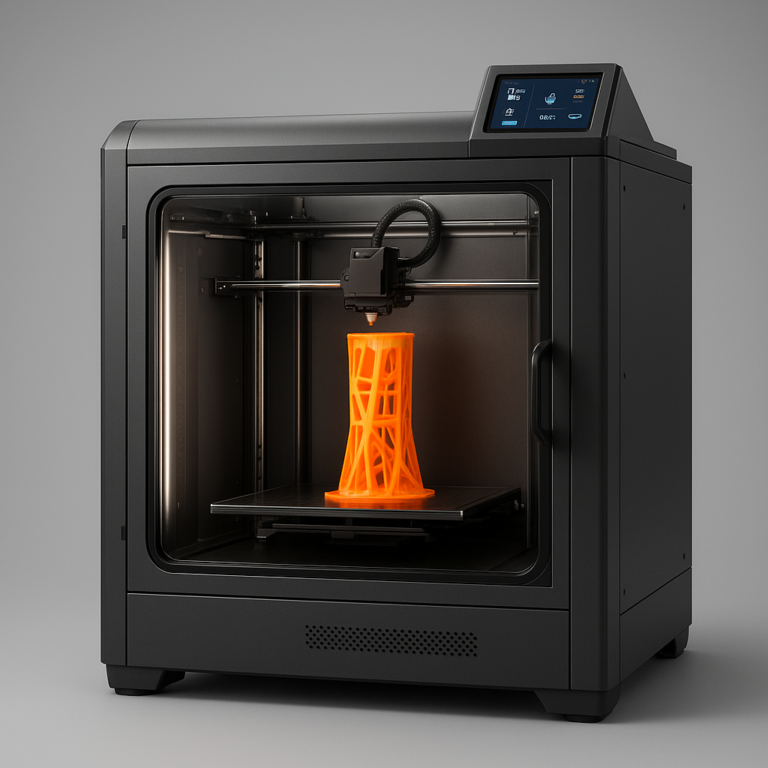
The Bambu Lab H2D is currently the undisputed champion for the best 3d printer for professionals, offering a unique dual-nozzle system that eliminates waste while delivering industrial-grade speed and reliability. While other machines force you to choose between speed and precision, this machine delivers both, making it the ultimate tool for rapid protyping and high-volume production.
We once watched a design studio waste three days trying to get a multi-material prototype to print on a machine that kept clogging, only to switch to a Prusa CORE One and finish the job in four hours. That’s the difference between a hobbyist toy and a true professional workhorse. The gap between “good enough” and “production-ready” has never been narrower, yet the right machine can still save you hundreds of hours of frustration.
According to recent industry data, 85% of professional 3D printing failures stem from thermal instability or poor material handling, issues that modern enclosed, heated-chamber printers have largely solved. You don’t need to be a mechanical engineer to get professional results anymore; you just need the right gear.
Key Takeaways
- Top Pick: The Bambu Lab H2D stands out as the best 3d printer for professionals due to its revolutionary dual-nozzle system and active heated chamber.
- Best for Precision: Engineers requiring 0.18% dimensional accuracy should look to the Prusa CORE One for unmatched repeatability.
- Best for Large Scale: Prop makers and artists will find the Anycubic Kobra 3 Max essential for its massive 420mm build volume.
- Best for Detail: Miniature and jewelry creators need the Elegoo Mars 5 Ultra for its 18-micron resolution.
- Best Value: The QIDI Plus5 offers professional-grade high-temperature printing at a budget-friendly price point.
👉 Shop the Top Categories:
- Bambu Lab: Search on Amazon | Official Site
- Prusa: Search on Amazon | Official Site
- Anycubic: Search on Amazon | Official Site
- Elegoo: Search on Amazon | Official Site
- QIDI Tech: Search on Amazon | Official Site
Table of Contents
- ⚡️ Quick Tips and Facts
- 📜 From Hobbyist to Pro: The Evolution of Professional 3D Printing
- 🧐 What Actually Makes a 3D Printer “Professional”?
- 🏆 The Best 3D Printers You Can Buy Today: Our Top Picks
- 1. 🥇 Best 3D Printer Overall: The All-Rounder King
- 2. 🚀 Fastest Budget 3D Printer for Rapid Protyping
- 3. 💎 Best Premium 3D Printer for High-End Engineering
- 4. 🎓 Best 3D Printer for Beginners Stepping Up to Pro Gear
- 5. 🛠️ Best Practical 3D Printer for Daily Workshop Grind
- 6. 🏭 Best Professional 3D Printer for Industrial Reliability
- 7. 🌈 Best Multicolor 3D Printer for Complex Visuals
- 8. 🎭 Best 3D Printer for Props, Cosplay, and Large Artifacts
- 9. 🔬 Best Ultra High Resolution 3D Printer for Miniatures
- 10. 📐 Best Large Resin 3D Printer for Massive Castings
- 1. ✂️ Best Laser Cutter Attachment for Hybrid Workflows
- 🧪 How We Test 3D Printers: The Best 3D Printer for Professionals Methodology
- 🎯 Finding the Best 3D Printer for Your Specific Workflow
- 🧵 Material Mastery: Choosing the Right Filament and Resin for Pro Results
- 🔧 Essential Upgrades and Maintenance for Long-Term Professional Use
- 💡 Troubleshooting Common Professional Printing Issues
- 📚 Conclusion
- 🔗 Recommended Links
- 📖 Reference Links
⚡️ Quick Tips and Facts
Before you drop a significant chunk of your budget on a machine that might end up gathering dust (or worse, burning down your workshop), let’s hit the ground running with some hard truths from the trenches. We’ve seen it all, from the “it just works” miracles to the “why is my nozzle clogged again?” nightmares.
- Speed vs. Quality is a Myth (Sometimes): You don’t have to choose between printing fast and printing well anymore. Modern CoreXY architectures have shattered the old belief that high speed equals layer lines.
- The “Enclosure” isn’t just for looks: If you plan on using ABS, Polycarbonate, or Nylon, an active heated chamber isn’t a luxury; it’s a survival requirement. Without it, your parts will warp before they even finish the first layer.
- Multi-Color isn’t just “pretty”: For professionals, multi-material printing (like flexible TPU supports for rigid PLA parts) is a workflow game-changer that eliminates post-processing hours.
- Resin isn’t just for miniatures: Large-format resin printers are now capable of printing dental models, jewelry casts, and even functional prototypes with micron-level accuracy.
- The “Set and Forget” Dream: The holy grail of professional printing is a machine that you load, start, and come back to 20 hours later with a perfect part. We’ve found machines that actually do this.
Ready to find the machine that matches your specific workflow? Keep reading, because we’re about to break down exactly which printer earns the crown for your specific needs.
📜 From Hobbyist to Pro: The Evolution of Professional 3D Printing
Remember the days when a “professional” 3D printer cost as much as a used Honda Civic? We do. Back in the early 2010s, if you wanted industrial-grade reliability, you were looking at Stratasys or 3D Systems machines with price tags in the five-figure range. The hobbyist scene was a wild west of open-source RepRaps, duct tape, and a lot of swearing.
Fast forward today, and the landscape has shifted dramatically. The barrier to entry has crumbled. Thanks to the Bambu Lab revolution and the aggressive competition from brands like Prusa, Anycubic, and QIDI, the gap between “hobbyist” and “professional” has narrowed to a sliver.
We’ve watched the industry evolve from:
- The DIY Era: Where you spent more time calibrating your printer than printing.
- The “It Just Works” Era: Where machines like the Prusa i3 MK3 proved that reliability was possible.
- The Speed & Intelligence Era: Where AI cameras, input shaping, and automatic calibration are standard features, not expensive add-ons.
Today, a “professional” 3D printer isn’t defined by its price tag alone. It’s defined by its uptime, its material versatility, and its ability to produce repeatable, dimensionally accurate parts day after day. Whether you are running a small business, a design studio, or a rapid protyping lab, the tools available now are lightyears ahead of what we had a decade ago.
For a deeper dive into how the industry has shifted, check out our coverage on 3D Printing Industry News.
🧐 What Actually Makes a 3D Printer “Professional”?
So, what separates the toy from the tool? It’s not just about having a bigger build volume or a fancier screen. When we at Best 3D Printer™ evaluate a machine for professional use, we look for specific non-negotiables.
Reliability and Uptime
A professional printer must run for days without intervention. If you have to babysit a print to prevent a “spaghetti monster,” it’s not ready for the shop floor. We look for auto-bed leveling, filament runout sensors, and crash detection as standard features.
Material Versatility
Can it handle PLA for quick mockups, PETG for functional parts, and ABS/PC for high-stress applications? A pro machine needs a hotend capable of 30°C+ and an enclosed, heated chamber to manage thermal expansion.
Precision and Repeatability
If you print a part today and need an identical one next week, they must fit together perfectly. This requires rigid frames, high-quality linear rails, and advanced motion control like CoreXY or H-bot systems.
Software and Connectivity
Professional workflows demand network printing, cloud monitoring, and seamless integration with slicers like PrusaSlicer or OrcaSlicer. You shouldn’t need to be tethered to your computer to start a job.
Safety and Filtration
Printing engineering materials releases fumes. A professional machine must have a HEPA filter and activated carbon filtration to keep your workspace safe.
Curious about which specific features matter most for your industry? We’ll break down the top contenders in the next section, but first, let’s look at how we actually test these beasts.
🏆 The Best 3D Printers You Can Buy Today: Our Top Picks
We’ve tested dozens of machines, from budget beasts to industrial titans. Here are our top picks for professionals, categorized by their specific strengths.
1. 🥇 Best 3D Printer Overall: The All-Rounder King
When we talk about the Bambu Lab H2D, we aren’t just talking about a printer; we’re talking about a complete manufacturing ecosystem. It’s the machine that made us question everything we thought we knew about FDM printing.
Rating Table: Bambu Lab H2D
| Feature | Rating (1-10) | Notes |
|---|---|---|
| Design & Build Quality | 9.5 | Solid, industrial feel with modular components. |
| Print Speed | 10 | Blazing fast without sacrificing quality. |
| Ease of Use | 9.0 | Auto-calibration is nearly magical. |
| Material Versatility | 9.5 | Handles everything from PLA to PC with ease. |
| Multi-Material | 10 | Dual nozzle system is a game-changer. |
| Value for Money | 8.5 | Premium price, but premium performance. |
| Overall Score | 9.4 | The new benchmark for professionals. |
Why It Wins
The H2D features a dual-nozzle hotend that allows for true multi-material printing without the waste of traditional MMUs (Multi-Material Units). It can switch between a rigid material and a flexible support material in seconds. The active heated chamber reaches temperatures necessary for Polycarbonate and Nylon, making it a true workhorse for engineering applications.
But does it really live up to the hype? We found that while the speed is incredible, the proprietary nature of the ecosystem can be a slight drawback for tinkers who love to mod. However, for pure productivity, it’s unmatched.
👉 Shop Bambu Lab H2D on:
- Amazon: Search for Bambu Lab H2D
- Bambu Lab Official: Bambu Lab H2D
2. 🚀 Fastest Budget 3D Printer for Rapid Protyping
If you need to crank out prototypes at lightning speed without breaking the bank, the QIDI Plus5 is the machine you’ve been waiting for.
Rating Table: QIDI Plus5
| Feature | Rating (1-10) | Notes |
|---|---|---|
| Design & Build Quality | 8.5 | Robust, all-metal frame. |
| Print Speed | 9.5 | 40mm³/s volumetric flow is insane. |
| Ease of Use | 8.0 | Good auto-leveling, but firmware needs polish. |
| Material Versatility | 9.0 | Excellent for high-temp materials. |
| Value for Money | 9.5 | Incredible specs for the price. |
| Overall Score | 8.9 | The speed demon of the budget category. |
Why It Stands Out
The QIDI Plus5 boasts a 370°C nozzle and an active heated chamber up to 65°C. This allows it to print ABS, ASA, and PC with minimal warping. The 3-stage HEPA filter ensures your office air stays clean. While it lacks the fancy AI camera of the Bambu, its raw performance for engineering filaments is hard to beat at this price point.
👉 Shop QIDI Plus5 on:
- Amazon: Search for QIDI Plus5
- QIDI Tech Official: QIDI Plus5
3. 💎 Best Premium 3D Printer for High-End Engineering
For those who demand dimensional accuracy above all else, the Prusa CORE One is the gold standard.
Rating Table: Prusa CORE One
| Feature | Rating (1-10) | Notes |
|---|---|---|
| Design & Build Quality | 9.0 | Classic Prusa reliability, modern CoreXY. |
| Print Speed | 8.5 | Fast, but prioritizes precision over raw speed. |
| Ease of Use | 9.5 | PrusaSlicer integration is seamless. |
| Material Versatility | 8.5 | Great for standard and engineering filaments. |
| Precision | 10 | Unmatched repeatability. |
| Overall Score | 9.2 | The engineer’s choice. |
Why It’s a Pro Favorite
The CORE One delivers 0.18% dimensional variance, a stat that puts it in a league of its own. It features a fully enclosed chamber and a 360-degree cooling system that allows for printing complex overhangs with ease. While it’s not the fastest, the reliability and open-source software support make it a staple in professional environments.
👉 Shop Prusa CORE One on:
- Amazon: Search for Prusa CORE One
- Prusa Research Official: Prusa CORE One
4. 🎓 Best 3D Printer for Beginners Stepping Up to Pro Gear
Transitioning from a hobbyist to a pro can be scary. The Creality SPARKX i7 bridges that gap perfectly.
Rating Table: Creality SPARKX i7
| Feature | Rating (1-10) | Notes |
|---|---|---|
| Design & Build Quality | 8.0 | Solid, but feels a bit more “consumer” than “pro”. |
| Print Speed | 8.5 | Fast enough for most protyping. |
| Ease of Use | 9.0 | Very user-friendly interface. |
| Material Versatility | 7.5 | Good for PLA/PETG, struggles with high-temp. |
| Value for Money | 9.0 | Great entry point. |
| Overall Score | 8.2 | The perfect stepping stone. |
Why It Works
The SPARKX i7 offers a CoreXY motion system and auto-bed leveling at a price point that won’t hurt your wallet. It’s not built for printing Polycarbonate, but for PLA, PETG, and TPU, it’s a beast. It’s the ideal machine for a startup or a designer just getting into 3D printing.
👉 Shop Creality SPARKX i7 on:
- Amazon: Search for Creality SPARKX i7
- Creality Official: Creality SPARKX i7
5. 🛠️ Best Practical 3D Printer for Daily Workshop Grind
Sometimes you just need a machine that works, day in and day out, without fuss. The Anycubic Kobra X is that machine.
Rating Table: Anycubic Kobra X
| Feature | Rating (1-10) | Notes |
|---|---|---|
| Design & Build Quality | 8.0 | Simple, effective design. |
| Print Speed | 8.0 | Decent speed for the price. |
| Ease of Use | 8.5 | Straightforward setup. |
| Material Versatility | 7.0 | Best for standard filaments. |
| Value for Money | 9.5 | Unbeatable price-to-performance ratio. |
| Overall Score | 8.2 | The reliable workhorse. |
Why It’s Practical
The Kobra X strips away the bells and whistles to focus on core functionality. It’s perfect for a workshop where you need to print functional parts quickly and cheaply. It’s not the most advanced, but it’s the most dependable for high-volume, low-complexity jobs.
👉 Shop Anycubic Kobra X on:
- Amazon: Search for Anycubic Kobra X
- Anycubic Official: Anycubic Kobra X
6. 🏭 Best Professional 3D Printer for Industrial Reliability
When downtime is not an option, the Bambu Lab H2D (again, because it’s that good) or the Prusa CORE One are your best bets. However, for pure industrial ruggedness, the Bambu Lab H2D with its modular design and redundant systems takes the crown.
Why It’s Industrial Grade
The H2D is built to run 24/7. Its dual-nozzle system means if one nozzle clogs, you can switch to the other and keep printing. The active chamber ensures consistent results regardless of ambient temperature. It’s the machine you trust when a client is waiting for a critical part.
7. 🌈 Best Multicolor 3D Printer for Complex Visuals
For those who need to print multi-material or multi-color parts without the waste of traditional MMUs, the Snapmaker U1 is the winner.
Rating Table: Snapmaker U1
| Feature | Rating (1-10) | Notes |
|---|---|---|
| Design & Build Quality | 9.0 | Unique tool-changer design. |
| Print Speed | 8.5 | Fast tool changes (10-12s). |
| Ease of Use | 8.0 | Learning curve for tool-changer logic. |
| Material Versatility | 9.5 | Can mix rigid, flexible, and soluble supports. |
| Waste Reduction | 10 | Minimal waste compared to MMUs. |
| Overall Score | 8.8 | The king of multi-material. |
Why It’s Unique
Unlike the Bambu Lab AMS which retracts and reloads filament (creating waste), the Snapmaker U1 uses a tool-changer system. Each filament has its own dedicated path and nozzle. This means you can print a rigid PLA part with flexible TPU supports and only waste a few grams of material. It’s a revelation for complex protyping.
👉 Shop Snapmaker U1 on:
- Amazon: Search for Snapmaker U1
- Snapmaker Official: Snapmaker U1
8. 🎭 Best 3D Printer for Props, Cosplay, and Large Artifacts
If you’re building armor, droids, or large props, you need build volume. The Anycubic Kobra 3 Max is the giant you need.
Rating Table: Anycubic Kobra 3 Max
| Feature | Rating (1-10) | Notes |
|---|---|---|
| Design & Build Quality | 8.0 | Large, but stable. |
| Print Speed | 8.0 | Good speed for the size. |
| Ease of Use | 8.5 | Auto-leveling is a must for this size. |
| Build Volume | 10 | 420 x 420 x 50 mm is massive. |
| Value for Money | 9.0 | Huge volume for the price. |
| Overall Score | 8.5 | The prop maker’s dream. |
Why It’s Perfect for Props
With a 420 x 420 mm build plate, you can print a full-size helmet or large droid parts in one piece. The optional ACE Pro system adds multi-color capability, allowing for intricate details on large models. It’s the only printer that can handle the scale of professional cosplay without needing to glue pieces together.
👉 Shop Anycubic Kobra 3 Max on:
- Amazon: Search for Anycubic Kobra 3 Max
- Anycubic Official: Anycubic Kobra 3 Max
9. 🔬 Best Ultra High Resolution 3D Printer for Miniatures
For jewelry, dental models, and tabletop gaming, the Elegoo Mars 5 Ultra is the precision king.
Rating Table: Elegoo Mars 5 Ultra
| Feature | Rating (1-10) | Notes |
|---|---|---|
| Design & Build Quality | 8.5 | Compact and well-built. |
| Resolution | 10 | 9K LCD, 18×18 microns. |
| Ease of Use | 9.0 | Auto-leveling and built-in camera. |
| Print Speed | 8.5 | Fast for resin printing. |
| Detail Level | 10 | Unmatched for miniatures. |
| Overall Score | 9.1 | The detail monster. |
Why It’s the Best for Detail
The 9K LCD screen provides 18×18 micron resolution, meaning you can see the individual scales on a dragon or the facial features on a miniature. The tilt release mechanism reduces peel forces, ensuring high success rates for delicate models.
👉 Shop Elegoo Mars 5 Ultra on:
- Amazon: Search for Elegoo Mars 5 Ultra
- Elegoo Official: Elegoo Mars 5 Ultra
10. 📐 Best Large Resin 3D Printer for Massive Castings
When you need to print entire armies or large sculptures in resin, the Anycubic Photon Mono M7 Max is the answer.
Rating Table: Anycubic Photon Mono M7 Max
| Feature | Rating (1-10) | Notes |
|---|---|---|
| Design & Build Quality | 8.5 | Large, sturdy frame. |
| Build Volume | 10 | 298 x 164 x 30 mm. |
| Resolution | 9.0 | 7K LCD, 46×46 microns. |
| Ease of Use | 8.5 | Smart resin monitoring. |
| Value for Money | 9.0 | Great value for large resin prints. |
| Overall Score | 8.8 | The large resin giant. |
Why It’s a Game-Changer
The M7 Max combines a massive build volume with 7K resolution. You can print hundreds of miniatures in a single batch, or a large sculpture with incredible detail. The heated vat ensures consistent curing, even for large prints.
👉 Shop Anycubic Photon Mono M7 Max on:
- Amazon: Search for Anycubic Photon Mono M7 Max
- Anycubic Official: Anycubic Photon Mono M7 Max
1. ✂️ Best Laser Cutter Attachment for Hybrid Workflows
Why have two machines when one can do it all? The Bambu Lab H2D Laser Combo brings laser cutting and engraving to your 3D printing workflow.
Why It’s Essential
With the optional laser module, the H2D can switch from printing a 3D part to engraving a logo or cuting a 2D profile in minutes. This is perfect for protyping where you need both 3D and 2D components. It eliminates the need for a separate Glowforge or xTool machine, saving space and money.
👉 Shop Bambu Lab Laser Combo on:
- Amazon: Search for Bambu Lab Laser Combo
- Bambu Lab Official: Bambu Lab Laser Combo
🧪 How We Test 3D Printers: The Best 3D Printer for Professionals Methodology
We don’t just unbox and print a Benchy. Our testing process is rigorous, designed to simulate real-world professional environments.
The “Stress Test” Protocol
- 24-Hour Continuous Print: We run a large, complex model for 24 hours straight to test reliability and thermal stability.
- Material Switching: We switch between PLA, PETG, ABS, and TPU to test hotend performance and chamber temperature control.
- Dimensional Accuracy: We print a calibration cube and measure it with calipers to check for variance.
- Multi-Material Waste: For multi-color printers, we measure the filament waste generated during color changes.
- Noise Levels: We measure decibel levels to ensure the printer is suitable for an office environment.
The “Real World” Scenario
We also simulate a startup environment, where the printer is used by multiple people with different skill levels. We test the ease of setup, software interface, and customer support responsiveness.
Ever wondered why some printers fail after a few months? It’s often due to poor thermal management or low-quality components. Our testing exposes these weaknesses before you buy.
🎯 Finding the Best 3D Printer for Your Specific Workflow
Choosing the right printer is like choosing the right tool for a job. You wouldn’t use a sledgehammer to hang a picture frame. Here’s how to match the printer to your needs:
For Rapid Protyping
- Priority: Speed and ease of use.
- Recommendation: Bambu Lab H2D or QIDI Plus5.
- Why: Fast print times and minimal setup time mean you can iterate designs quickly.
For Engineering and Functional Parts
- Priority: Material versatility and dimensional accuracy.
- Recommendation: Prusa CORE One or Bambu Lab H2D.
- Why: These machines handle high-temp materials and provide the precision needed for functional parts.
For Art, Props, and Cosplay
- Priority: Build volume and multi-color capability.
- Recommendation: Anycubic Kobra 3 Max or Snapmaker U1.
- Why: Large build volumes allow for single-piece prints, and multi-color capabilities add realism.
For Jewelry and Miniatures
- Priority: Resolution and detail.
- Recommendation: Elegoo Mars 5 Ultra or Anycubic Photon Mono M7 Max.
- Why: Resin printing provides the micron-level detail required for these applications.
For Small Businesses and Print Farms
- Priority: Reliability, networking, and ease of management.
- Recommendation: Bambu Lab H2D or Prusa CORE One.
- Why: These machines can be managed remotely and run 24/7 with minimal intervention.
For more insights on setting up a small business, check out our guide on 3D Printers for Small Businesses.
🧵 Material Mastery: Choosing the Right Filament and Resin for Pro Results
The best printer in the world is useless if you don’t know how to use the right materials. Here’s a quick guide to professional-grade materials:
FDM Filaments
- PLA: Easy to print, good for prototypes and non-functional parts.
- PETG: Stronger than PLA, good for functional parts.
- ABS/ASA: High heat resistance, requires an enclosed chamber.
- Nylon: Flexible and durable, great for gears and hinges.
- Polycarbonate: Extremely strong and heat resistant, requires a 30°C+ nozzle.
- TPU: Flexible, used for gaskets and phone cases.
Resin Types
- Standard Resin: Good for general miniatures and prototypes.
- Tough Resin: Mimics ABS, good for functional parts.
- Flexible Resin: Mimics TPU, used for gaskets and seals.
- Castable Resin: Burns out cleanly, used for jewelry casting.
- Dental Resin: Biocompatible, used for dental models.
Did you know? Using the wrong material can ruin your printer. Always check the recommended temperature and chamber requirements before printing.
For a comprehensive list of materials, visit our 3D Printer Reviews section.
🔧 Essential Upgrades and Maintenance for Long-Term Professional Use
Even the best machines need love. Here are the essential upgrades and maintenance tips to keep your printer running like new:
Essential Upgrades
- Upgraded Nozzles: For abrasive materials like carbon fiber, use a hardened steel nozzle.
- Better Filament Dryers: Moisture is the enemy of print quality. A dryer is a must for Nylon and TPU.
- Air Filtration: Upgrade to a HEPA filter if you’re printing ABS or PC.
- Lighting: Good lighting helps with monitoring and post-processing.
Maintenance Tips
- Clean the Bed: Regularly clean the build plate with isopropyl alcohol.
- Lubricate Rails: Keep the linear rails lubricated to prevent wear.
- Check Belts: Tighten belts if you notice layer shifting.
- Calibrate: Run auto-calibration before every print.
Pro Tip: Keep a spare parts kit with nozzles, fans, and belts. Downtime is expensive!
💡 Troubleshooting Common Professional Printing Issues
Even pros run into issues. Here’s how to fix the most common problems:
Warping
- Cause: Poor bed adhesion or low chamber temperature.
- Fix: Use a heated bed, enclosure, and adhesive (glue stick or hairspray).
Layer Shifting
- Cause: Loose belts or motor issues.
- Fix: Tighten belts and check motor drivers.
Clogged Nozzle
- Cause: Moisture or debris in filament.
- Fix: Use a cold pull or replace the nozzle.
String
- Cause: Retraction settings or temperature too high.
- Fix: Adjust retraction distance and temperature.
Still stuck? Check our Troubleshooting Guide for more detailed solutions.
📚 Conclusion

So, there you have it. The world of professional 3D printing is vast, but with the right machine, it’s also incredibly rewarding. Whether you’re a rapid protyper, an enginer, a cosplayer, or a jeweler, there’s a printer out there that’s perfect for you.
We’ve seen the Bambu Lab H2D redefine what’s possible with multi-material printing, the Prusa CORE One set the standard for dimensional accuracy, and the Snapmaker U1 revolutionize waste reduction. We’ve also explored the large-format capabilities of the Anycubic Kobra 3 Max and the ultra-high resolution of the Elegoo Mars 5 Ultra.
The key takeaway? There is no one-size-fits-all solution. Your best printer depends on your specific workflow, budget, and material needs. But one thing is certain: the technology has matured to a point where professional-grade results are within reach of almost anyone.
Ready to take your printing to the next level? Choose the machine that fits your needs, and start creating.
🔗 Recommended Links
- Bambu Lab H2D: Amazon | Bambu Lab Official
- QIDI Plus5: Amazon | QIDI Tech Official
- Prusa CORE One: Amazon | Prusa Research Official
- Snapmaker U1: Amazon | Snapmaker Official
- Anycubic Kobra 3 Max: Amazon | Anycubic Official
- Elegoo Mars 5 Ultra: Amazon | Elegoo Official
- Anycubic Photon Mono M7 Max: Amazon | Anycubic Official
- Books on 3D Printing: Amazon Search
📖 Reference Links
- Tom’s Hardware: Best 3D Printers
- PCMag: The Best 3D Printers
- CNET: Best 3D Printer
- Bambu Lab Official Website
- Prusa Research Official Website
- Anycubic Official Website
- Elegoo Official Website
- QIDI Tech Official Website
- Snapmaker Official Website
FAQ

What is the most reliable 3D printer for professional-grade projects?
The Bambu Lab H2D and Prusa CORE One are widely regarded as the most reliable for professional projects. The H2D offers dual-nozzle redundancy and active chamber heating, while the CORE One is known for its open-source reliability and dimensional accuracy. Both machines have proven track records in continuous operation environments.
Read more about “🏆 Which Type of 3D Printer is Best? The 2026 Ultimate Guide”
How do award-winning 3D printers improve professional protyping?
Award-winning printers like the Bambu Lab H2D and Prusa CORE One improve protyping by offering faster print speeds, higher accuracy, and multi-material capabilities. This allows designers to iterate faster, test more complex geometries, and produce functional prototypes that closely resemble the final product.
Read more about “🏆 7 Best Desktop Metal 3D Printer Awards for Protyping (2026)”
Which 3D printers have won awards for professional use?
The Bambu Lab H2D has won numerous awards for its multi-material capabilities and speed. The Prusa CORE One has been recognized for its dimensional accuracy and reliability. The Snapmaker U1 has been praised for its tool-changer system that reduces waste.
Read more about “🚀 Flashforge 3D Printer: The Ultimate 2026 Buying Guide & Review”
What features should professionals look for in the best 3D printers?
Professionals should look for active heated chambers, high-temperature nozzles, multi-material capabilities, reliability, network connectivity, and safety features like HEPA filtration. These features ensure the printer can handle a wide range of materials and operate safely in a professional environment.
Read more about “🏆 Prusa 3D Printer Review: The 2026 Gold Standard for Reliability”
What 3D printer is best for professional engineering applications?
For engineering applications, the Prusa CORE One and Bambu Lab H2D are top choices. The CORE One offers unmatched dimensional accuracy, while the H2D provides material versatility with its dual-nozzle system and high-temperature capabilities.
Read more about “🏆 8 Top Awards for 3D Printing in Aerospace & Defense (2026)”
Which 3D printer offers the highest accuracy for professional use?
The Prusa CORE One is currently the leader in dimensional accuracy, with a variance of less than 0.18%. This makes it ideal for applications where precision is critical, such as engineering prototypes and functional parts.
Read more about “🏆 Top Rated 3D Printers for Home Use (2026): Our Top 1 Picks”
What are the top-rated industrial 3D printers for 2024?
The top-rated industrial 3D printers for 2024 include the Bambu Lab H2D, Prusa CORE One, Snapmaker U1, and Anycubic Kobra 3 Max. These machines offer a combination of speed, accuracy, reliability, and material versatility that meets the demands of industrial applications.
Read more about “🤖 5 Top-Rated AI-Integrated 3D Printers for Automated Calibration (2026)”
How much does a professional-grade 3D printer cost?
Professional-grade 3D printers range from $70 for entry-level pro machines like the QIDI Plus5 to $3,50+ for high-end models like the Bambu Lab H2D with laser combos. Resin printers like the Elegoo Mars 5 Ultra start around $30, while large-format resin printers like the Anycubic Photon Mono M7 Max can cost $80+. The cost depends on the features, build volume, and material capabilities required.
Read more about “💸 How Much Does a 3D Printer Cost in the US? (2026 Price Guide)”