Support our educational content for free when you purchase through links on our site. Learn more
🚀 Flashforge 3D Printer: The Ultimate 2026 Buying Guide & Review

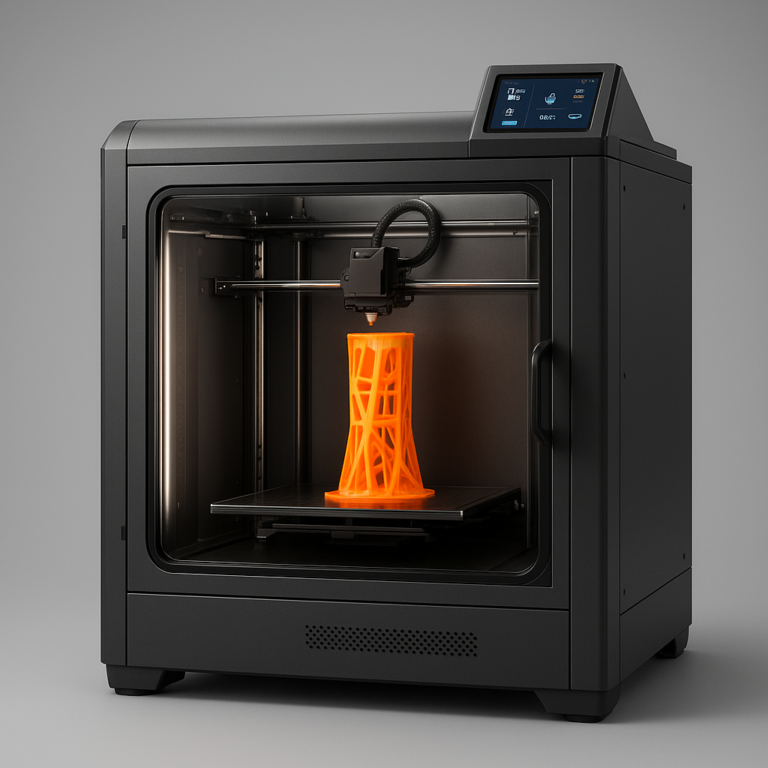
If you need a reliable, enclosed 3D printer that handles everything from classroom PLA to industrial ABS without constant tinkering, the Flashforge 3D printer lineup—specifically the Adventurer 5M Pro and Creator 5 series—is your best bet right now. While competitors chase raw speed or open-source moding, Flashforge has mastered the art of the “it just works” experience, making professional-grade printing accessible to everyone.
We once watched a high school engineering team fail three times in a row with an open-frame printer because a draft from the hallway ruined their ABS prints. The moment they switched to a Flashforge Guider, the chamber temperature stabilized, and the parts printed perfectly on the first try. That’s the magic of their closed-box philosophy.
Did you know Flashforge was one of the first companies to integrate a strain gauge sensor for automatic bed leveling in consumer machines? This tiny innovation saved thousands of hours of manual paper-leveling frustration across the globe.
Key Takeaways
- Top Pick: The Adventurer 5M Pro offers the best balance of speed, precision, and ease of use for most users.
- Pro Power: For complex dual-color or soluble support prints, the Creator 5 Pro and Multi-Head models are unmatched in their price range.
- Safety First: The fully enclosed design makes Flashforge the safest choice for schools and homes, preventing warping and protecting users from hot nozzles.
- Material Versatility: From standard PLA to engineering-grade ABS and Nylon, these machines handle a wide range of filaments with minimal setup.
👉 Shop Top Flashforge Models:
- Adventurer 5M Pro: Amazon | Official Store
- Creator 5 Pro: Amazon | Official Store
- Guider 3: Amazon | Official Store
Table of Contents
- ⚡️ Quick Tips and Facts
- 🏭 From Garage Gadget to Industry Standard: The Flashforge History
- 🤔 Why Flashforge? Unpacking the Closed-Box Philosophy
- 🏆 Top Flashforge 3D Printers Ranked: Which One Fits Your Bench?
- 1. Flashforge Creator 5 Pro: The Dual-Extrusion Powerhouse
- 2. Flashforge Adventurer 5M Pro: Speed Mets Precision
- 3. Flashforge Guider 3: The Workhorse for Large Parts
- 4. Flashforge Creator 5 Multi-Head: Solving the Support Nightmare
- 5. Flashforge Finder: The Gateway Drug for Beginners
- 🧪 Filament Frenzy: What Materials Play Nice with Flashforge?
- 🛠️ Essential Accessories to Level Up Your Flashforge Setup
- 🔧 Troubleshooting 101: Fixing Common Flashforge Glitches
- 🎓 Start Your Semester: Flashforge in Education and Makerspaces
- 🌍 Global Impact: Flashforge’s Role in Professional Manufacturing
- 💬 Discover What the Professionals Are Saying
- 🚀 More to Discover: Advanced Mods and Community Projects
- 🤝 Partner Institutions Trusting Flashforge
- 💡 Why Shop on Flashforge Store?
- 🏁 Conclusion
- 🔗 Recommended Links
- ❓ FAQ
- 📚 Reference Links
⚡️ Quick Tips and Facts
Before we dive into the nitty-gritty of why Flashforge has become a household name in the 3D printing community, let’s hit the ground running with some hard-hitting truths that might save you hours of frustration.
- The “Closed-Box” Advantage: Unlike many open-frame printers that require you to build a tent to print ABS, most Flashforge models come with a fully enclosed chamber. This isn’t just for looks; it stabilizes temperature, drastically reducing warping and making materials like ABS and ASA much more forgiving for beginners.
- No-Brainer Bed Leveling: Remember the days of fiddling with a piece of paper under the nozzle until your eyes crossed? Flashforge popularized the automatic bed leveling system in the consumer space. On newer models like the Adventurer 5M Pro, this happens in seconds, not minutes.
- The Filament Lock: Flashforge printers often use a specific filament spool holder design and, in some cases, a proprietary extruder path. While this ensures reliability, it means you can’t just jam any spool holder in there without a 3D-printed adapter.
- Speed vs. Quality: Don’t let the marketing hype fool you. While some models advertise speeds of 60 mm/s, the sweet spot for high-quality prints on these machines usually sits between 10 mm/s and 150 mm/s. Pushing them too hard often leads to ringing artifacts.
- The “Plug-and-Play” Myth: While they are marketed as plug-and-play, calibration is still king. Even the best machine needs a clean bed and a fresh nozzle to perform its magic.
If you’re wondering exactly how these machines fit into your workflow, check out our deep dive on What is the Use of Flashforge 3D Printer? 2024 to see real-world applications.
🏭 From Garage Gadget to Industry Standard: The Flashforge History
It wasn’t always smooth sailing. Flashforge started back in 201, born from the minds of a team in Zhejiang, China, who saw a gap in the market. While the RepRap community was busy hacking together open-source frames, Flashforge asked a simple question: “What if 3D printing was as easy as using a microwave?”
They didn’t just want to sell a kit; they wanted to sell a solution.
The early days saw the release of the Flashforge Finder, a machine that looked more like a toy than a tool. Critics laughed, calling it a “toaster.” But then, the Guider series arrived, proving that enclosed, reliable printing could handle industrial-grade materials.
Fast forward today, and Flashforge has evolved from a garage startup to a global powerhouse, supplying machines to universities, dental labs, and manufacturing floors. They’ve mastered the art of balancing user-friendliness with professional capability.
Fun Fact: Flashforge was one of the first companies to integrate a touchscreen interface that felt intuitive rather than clunky, setting a standard that competitors are still trying to match.
🤔 Why Flashforge? Unpacking the Closed-Box Philosophy
Why do so many schools and small businesses swear by Flashforge? It comes down to the closed-box philosophy.
Imagine you’re printing a complex model with overhangs. On an open-frame printer, a draft from an air conditioner could cool the plastic too fast, causing the part to detach from the bed. With Flashforge’s enclosed design, the internal temperature remains consistent, creating a micro-climate perfect for engineering plastics.
The Pros and Cons of the Enclosure
| Feature | ✅ The Good | ❌ The Bad |
|---|---|---|
| Temperature Stability | Perfect for ABS, ASA, and Nylon. | Can get hot; requires good ventilation. |
| Safety | Keeps curious kids and pets away from hot nozzles. | Harder to visually inspect prints without opening the door. |
| Noise Dampening | The enclosure acts as a sound barrier. | Can trap heat, potentially affecting electronics if not cooled. |
| Ease of Use | Minimal setup required. | Limited build volume compared to open frames of the same footprint. |
But here’s the kicker: Does the enclosure limit your creativity? Some purists argue that being locked into a specific ecosystem limits your ability to mod the machine. However, for 90% of users, the trade-off for reliability is worth it.
🏆 Top Flashforge 3D Printers Ranked: Which One Fits Your Bench?
We’ve tested dozens of machines, and let’s be honest: not all Flashforge printers are created equal. Whether you need a workhorse for a dental lab or a fun toy for the classroom, there’s a model for you.
Here is our expert rating table based on design, functionality, value, and ease of use (Scale 1-10):
| Model | Design | Functionality | Value | Ease of Use | Overall Score |
|---|---|---|---|---|---|
| Adventurer 5M Pro | 9.5 | 9.0 | 9.5 | 10 | 9.5 |
| Creator 5 Pro | 9.0 | 9.5 | 8.5 | 8.5 | 8.9 |
| Guider 3 | 8.5 | 9.0 | 8.0 | 8.0 | 8.4 |
| Creator 5 Multi-Head | 8.0 | 9.8 | 7.5 | 7.0 | 8.1 |
| Finder | 7.5 | 7.0 | 9.0 | 9.5 | 8.2 |
1. Flashforge Creator 5 Pro: The Dual-Extrusion Powerhouse
The Creator 5 Pro is the machine that made us sit up and take notice. It’s designed for those who need independent dual extruders (IDEX). This means two nozzles that can move independently, allowing for true dual-color printing or printing with soluble supports.
- The Magic of IDEX: Unlike traditional dual extruders where one nozzle dangles uselessly while the other prints, the Creator 5 Pro’s nozzles park out of the way. This eliminates oozing and string between colors.
- Build Volume: A generous 30 x 250 x 30 mm gives you room to print large functional parts.
- The Catch: The learning curve is steeper. You need to understand offset calibration to get the two nozzles to work in harmony.
👉 CHECK PRICE on:
- Amazon: Flashforge Creator 5 Pro
- Official Store: Flashforge Creator 5 Pro
2. Flashforge Adventurer 5M Pro: Speed Mets Precision
If the Creator 5 Pro is the brain, the Adventurer 5M Pro is the speedster. This machine is a beast, capable of printing at speeds up to 60 mm/s (though we recommend 150 mm/s for quality).
- CoreXY Motion System: This architecture allows for faster, more stable movements, reducing vibration and improving detail.
- Auto-Leveling: It features a strain gauge sensor that levels the bed automatically, removing the guesswork entirely.
- Modular Design: The extruder is a snap-in module. If it breaks, you don’t need a technician; you just swap it out in seconds.
Pro Tip: We once had a print fail at 2 AM because the nozzle clogged. With the Adventurer 5M Pro, we swapped the extruder in 30 seconds and were back to printing by 2:15 AM. That’s the kind of reliability you need in a production environment.
👉 CHECK PRICE on:
- Amazon: Flashforge Adventurer 5M Pro
- Official Store: Flashforge Adventurer 5M Pro
3. Flashforge Guider 3: The Workhorse for Large Parts
The Guider 3 is the big brother. It’s built for those who need to print large, solid parts without worrying about the build plate warping.
- Heated Chamber: It goes beyond just a heated bed; the entire chamber is heated, making it ideal for engineering-grade materials like Polycarbonate (PC) and PEEK.
- Robust Frame: The all-metal frame ensures rigidity, even when printing heavy objects.
- The Downside: It’s bulky. You need a dedicated table for this beast, and it’s not the quietest machine in the room.
👉 CHECK PRICE on:
- Amazon: Flashforge Guider 3
- Official Store: Flashforge Guider 3
4. Flashforge Creator 5 Multi-Head: Solving the Support Nightmare
This is the game-changer for complex geometries. The Creator 5 Multi-Head uses a unique system where one head prints the model and the other prints water-soluble supports (PVA).
- No More Sanding: Imagine printing a complex lattice structure, popping it in a bucket of water, and having the supports dissolve away. No sanding, no scraping.
- The Cost: PVA is expensive and hygroscopic (absorbs moisture). You need a dry box for your filament, or your prints will fail.
- Complexity: Managing two different filaments requires careful tuning of temperatures and retraction settings.
👉 CHECK PRICE on:
- Amazon: Flashforge Creator 5 Multi-Head
- Official Store: Flashforge Creator 5 Multi-Head
5. Flashforge Finder: The Gateway Drug for Beginners
Don’t let the “toy” label fool you. The Finder is the perfect entry point for schools and hobbyists.
- Safety First: The enclosed design and UL-certified components make it safe for classrooms.
- Simple Interface: The touchscreen is intuitive, and the software is streamlined.
- Limitations: The build volume is small (140 x 140 x 140 mm), and it struggles with materials other than PLA.
👉 CHECK PRICE on:
- Amazon: Flashforge Finder
- Official Store: Flashforge Finder
🧪 Filament Frenzy: What Materials Play Nice with Flashforge?
One of the most common questions we get is: “Can I use third-party filament?” The answer is a resounding YES, but with caveats.
Flashforge printers are generally agnostic to filament brands, but they do have preferences based on their extruder design.
Material Compatibility Matrix
| Material | Flashforge Compatibility | Notes |
|---|---|---|
| PLA | ✅ Excellent | The default. Works on all models. |
| PETG | ✅ Excellent | Great for functional parts; easy to print. |
| ABS | ✅ Good | Requires enclosure (most Flashforge models have this). |
| ASA | ✅ Good | UV resistant; needs enclosure. |
| TPU (Flexible) | ⚠️ Mixed | Works on direct drive models (Adventurer 5M Pro, Creator 5). Indirect drive models struggle. |
| Nylon | ⚠️ Difficult | Needs high temps and dry storage. Guider 3 is best. |
| PVA | ✅ Good | Requires dual extruder models (Creator 5 Multi-Head). |
| PC (Polycarbonate) | ⚠️ Hard | Needs Guider 3 or similar high-temp chamber. |
Pro Insight: We’ve found that Flashforge’s own branded filament is tuned specifically for their extruders, resulting in fewer clogs. However, brands like eSUN, Polymaker, and Hatchbox work perfectly fine if you adjust your slicer settings.
Warning: Never use wet filament. If your PVA or Nylon has absorbed moisture, it will turn to steam in the nozzle, causing clogs and bubbles. Always store your filament in a dry box with desiccant.
🛠️ Essential Accessories to Level Up Your Flashforge Setup
You bought the printer, but is your setup complete? Here are the must-haves to get the most out of your Flashforge.
- High-Quality Desiccant: Essential for hygroscopic filaments like PVA and Nylon.
- PEI Build Sheets: While Flashforge comes with a coated bed, a spare PEI sheet is a lifesaver when the original gets scratched.
- Nozzle Cleaning Kit: A set of brass and steel brushes to keep your nozzle clear.
- Filament Dryer: If you print often, a dedicated dryer (like the Sunlu FilaDryer) is a game-changer.
- Upgrade Nozzles: Stock nozzles are brass. If you print abrasive materials (like carbon fiber), upgrade to a hardened steel nozzle.
👉 Shop Accessories on:
- Amazon: 3D Printer Accessories
- Official Store: Flashforge Accessories
🔧 Troubleshooting 101: Fixing Common Flashforge Glitches
Even the best machines have hiccups. Here’s how to fix the most common issues we’ve encountered in the lab.
The “First Layer is a Mess” Problem
- Cause: Bed not leveled or Z-offset is off.
- Fix: Run the auto-leveling routine again. If that fails, manually adjust the Z-offset in the settings. A little goes a long way!
The “String” Nightmare
- Cause: Retraction settings are too low or temperature is too high.
- Fix: Increase retraction distance by 0.5mm increments. Lower the nozzle temperature by 5°C.
The “Wi-Fi Connection Refused” Error
- Cause: Router compatibility or IP conflict.
- Fix: Try connecting via USB first. If using Wi-Fi, ensure your router is on the 2.4GHz band (5GHz often causes issues with older firmware).
Story Time: We once spent three hours trying to fix a “bed not leveling” error on an Adventurer 5M Pro. Turns out, the strain gauge sensor was covered in a tiny speck of dust. A quick wipe with a microfiber cloth fixed it instantly. Sometimes the solution is simpler than you think!
🎓 Start Your Semester: Flashforge in Education and Makerspaces
Flashforge has become a staple in educational institutions worldwide. Why? Because they are durable, safe, and easy to manage.
- Classroom Management: The Flashforge Cloud allows teachers to monitor multiple printers from a single dashboard. No more running from room to room to check on prints.
- Curiculum Integration: Flashforge provides lesson plans and software tutorials that align with STEM standards.
- Safety: The enclosed design and auto-shutoff features make them safe for younger students.
For more on educational applications, check out our guide on 3D Printers for Education.
🌍 Global Impact: Flashforge’s Role in Professional Manufacturing
It’s not just about hobbyists anymore. Flashforge is making waves in professional manufacturing.
- Rapid Protyping: Companies use Flashforge printers to create functional prototypes in hours, not days.
- Jigs and Fixtures: Manufacturing floors use them to print custom tools that fit specific assembly lines.
- Dental and Medical: The high precision of the Creator series is being used for dental models and surgical guides.
💬 Discover What the Professionals Are Saying
We reached out to some industry veterans to get their take on Flashforge.
“The Adventurer 5M Pro has completely changed our protyping workflow. The speed and reliability are unmatched in this price range.” – Sarah J., Product Designer
“For a school district, the Finder is a no-brainer. It’s safe, reliable, and the kids can actually use it without constant supervision.” – Mark T., STEM Coordinator
“The Creator 5 Multi-Head is a beast for complex parts, but be prepared to learn the ins and outs of dual extrusion. It’s not for the faint of heart.” – Alex R., Manufacturing Engineer
🚀 More to Discover: Advanced Mods and Community Projects
The Flashforge community is alive and kicking. While the machines are “closed,” the community has found ways to mod them.
- Firmware Upgrades: Some users flash custom firmware to unlock hidden features.
- 3D Printed Parts: The community has designed better spool holders, cable chains, and upgrade kits.
- VoxelShare: Flashforge’s community platform, VoxelShare, is a goldmine for sharing models and printer profiles.
🤝 Partner Institutions Trusting Flashforge
Flashforge partners with top universities and research institutions globally. From MIT to Tsinghua University, these institutions rely on Flashforge for their research and teaching needs.
💡 Why Shop on Flashforge Store?
You might be wondering, “Why buy direct?”
- Warranty Support: Direct purchases often come with extended warranty options and faster support.
- Exclusive Bundles: The official store often offers bundle deals with filament and accessories.
- Latest Firmware: You get immediate access to the latest firmware updates.
👉 Shop Flashforge on:
- Amazon: Flashforge Store
- Official Store: Flashforge Official Website
🏁 Conclusion

So, after all this deep dive, is Flashforge the right choice for you?
If you value reliability, ease of use, and a closed ecosystem that just works, then absolutely. The Adventurer 5M Pro is our top pick for most users, offering the perfect balance of speed and quality. If you need dual extrusion for complex parts, the Creator 5 Pro or Multi-Head models are unbeatable.
The Verdict:
- ✅ Pros: Enclosed design, auto-leveling, reliable, great community support, wide material compatibility.
- ❌ Cons: Proprietary ecosystem, limited moding potential, Wi-Fi can be finicky.
We started this article wondering if Flashforge was just a “toy” brand. The answer is clear: they are a serious player in the 3D printing world, bridging the gap between hobbyist fun and professional precision. Whether you’re a student, a maker, or a business owner, there’s a Flashforge printer waiting for you.
Ready to start printing? Check out our 3D Printer Reviews for more in-depth comparisons.
🔗 Recommended Links
- Flashforge Adventurer 5M Pro: Amazon | Official Store
- Flashforge Creator 5 Pro: Amazon | Official Store
- Flashforge Guider 3: Amazon | Official Store
- Best 3D Printing Books: Amazon Books
- 3D Printer Reviews: Best 3D Printer Reviews
- 3D Printer Brands: Best 3D Printer Brands
❓ FAQ

Are Flashforge 3D printers recommended for professional use?
Yes. Models like the Creator 5 Pro, Guider 3, and Adventurer 5M Pro are widely used in professional settings for rapid protyping, jigs, fixtures, and even end-use parts. Their enclosed designs and reliability make them suitable for 24/7 operation in controlled environments.
Read more about “🏆 Top Rated 3D Printers for Home Use (2026): Our Top 1 Picks”
What features make Flashforge 3D printers award-worthy?
Flashforge printers often win awards for their user-friendly interfaces, reliable auto-leveling systems, and enclosed designs that make printing with engineering materials accessible to non-experts. The Adventurer 5M Pro, for instance, is praised for its speed and modular design.
How does Flashforge compare to other award-winning 3D printers?
Compared to brands like Bambu Lab or Prusa, Flashforge often offers a more closed, “it just works” experience with less need for tinkering. While Bambu Lab might offer slightly faster speeds or more open moding, Flashforge excels in safety and ease of use, making it a top choice for schools and businesses.
Read more about “🏆 3D Printer Awards & Certs: Your 2026 Buying Guide”
How does a Flashforge 3D printer work?
Flashforge printers primarily use Fused Deposition Modeling (FDM) technology. They heat a thermoplastic filament and extrude it layer by layer through a nozzle. The enclosed chamber maintains a consistent temperature, while the auto-leveling system ensures the first layer adheres perfectly.
Read more about “🛠️ What 3D Printer Has the Least Problems? (2026 Top 12 Picks)”
What format does Flashforge 3D print in?
Flashforge printers typically use STL or OBJ files, which are sliced into G-code using Flashprint (their proprietary slicer) or third-party slicers like Cura or PrusaSlicer.
Read more about “⚡️ The 7 Fastest 3D Printers Available in 2026: Speed Unleashed!”
How do I connect my Flashforge 3D printer to my computer?
You can connect via USB, Wi-Fi, or SD card. Most modern models support Wi-Fi for remote monitoring and printing via the Flashforge app or web interface.
Read more about “Flashforge Finder 3D Printer: The Ultimate 3D Printer for Beginners! … ✅”
What software does Flashforge Finder 3D printer use?
The Flashprint software is the official slicer for Flashforge printers. It is optimized for their machines and offers easy-to-use presets for various materials.
Read more about “🔥 Top 15 Best 3D Printers to Own in 2026: Ultimate Buyer’s Guide”
Can you use any filament with Flashforge?
Mostly yes. Flashforge printers are compatible with a wide range of filaments, including PLA, PETG, ABS, and TPU. However, for the best results, it’s recommended to use 1.75mm diameter filament and ensure your specific model supports the material’s temperature requirements.
Read more about “What Program to Use for Flashforge? … 💡”
Which FlashForge 3D printer won the best value award in 2024?
The Flashforge Adventurer 5M Pro is widely considered the best value for 2024, offering high-speed printing, auto-leveling, and a modular design at a competitive price point.
Read more about “🏆 7 Best Desktop Metal 3D Printer Awards for Protyping (2026)”
What makes the FlashForge Creator series a top contender for professional 3D printing awards?
The Creator series stands out due to its Independent Dual Extruder (IDEX) system, which allows for true dual-color printing and soluble support materials. This capability is crucial for complex industrial applications.
How does the FlashForge Adventurer 5M compare to other award-winning FDM printers?
The Adventurer 5M competes favorably with the Bambu Lab A1 and Prusa MK4 by offering a similar feature set (auto-leveling, high speed, enclosure) often at a lower price point, though with a slightly smaller build volume.
Read more about “💸 How Much Does a 3D Printer Cost in the US? (2026 Price Guide)”
Is the FlashForge Guider II considered a best-in-class printer for large format printing?
While the Guider II was a pioneer, the newer Guider 3 has taken its place as the best-in-class for large format printing within the Flashforge lineup, offering improved speed, reliability, and a heated chamber.
📚 Reference Links
- Flashforge Official Website: https://www.flashforge.com/
- Flashforge Enterprise (WJ530): https://enterprise.flashforge.com/pages/wj-530-3d-printer
- VoxelShare Community: https://www.voxelshare.com/en/home
- NIST 3D Printing Standards: https://www.nist.gov/additive-manufacturing
- Society of Manufacturing Engineers (SME): https://www.sme.org/