Support our educational content for free when you purchase through links on our site. Learn more
🤖 What is a 3D Printer? The Ultimate Guide to Additive Magic (2026)

Ever stared at a pile of plastic filament and wondered how it transforms into a functional drone part or a lifelike anatomical heart? That’s the magic we’re diving into today. At Best 3D Printer™, we’ve spent countless hours knee-dep in resin fumes and tangled filaments, turning our garage into a mini-factory. We’ve seen the skepticism turn into awe when a $30 machine prints a gear that actually fits, or when a dentist prints a custom aligner in minutes. But what exactly is this machine that’s disrupting everything from aerospace to your kitchen countertop?
A 3D printer isn’t just a fancy inkjet; it’s a digital sculptor that builds the physical world one microscopic layer at a time. Whether you’re a hobbyist looking to print custom figurines or an engineer protyping the next big invention, understanding the core mechanics is your first step to mastery. In this guide, we’ll peel back the layers of FDM, SLA, and SLS technologies, debunk the myths about safety and cost, and reveal why 2026 is the golden year to jump in. By the end, you’ll know exactly which machine fits your needs and how to avoid the dreaded “spaghetti monster” failure. Ready to stop dreaming and start printing?
Key Takeaways
- Additive vs. Subtractive: Unlike traditional manufacturing that cuts away material, a 3D printer builds objects layer-by-layer, allowing for impossible geometries and minimal waste.
- Technology Matters: Choosing between FDM (affordable, durable), SLA (high-detail, smooth), and SLS (industrial strength) is the most critical decision for your project.
- Safety First: Not all printers are created equal; understanding ventilation requirements and material toxicity is essential before you hit “print.”
- Future-Proofing: With advancements in multi-material printing and bioprinting, the skills you learn today will remain relevant for decades.
Looking for the perfect starter machine? Check out our top picks for Best 3D Printers for Beginners or explore Industrial 3D Printers for professional needs.
Table of Contents
- ⚡️ Quick Tips and Facts
- 🕰️ From Sci-Fi Dreams to Reality: A Brief History of 3D Printing
- 🤔 What Exactly Is a 3D Printer? The Core Definition
- ⚙️ How Does a 3D Printer Work? The Magic Behind the Machine
- 🧱 The Big Showdown: FDM vs. SLA vs. SLS Explained
- 🛠️ Essential 3D Printer Components: Anatomy of a Maker
- 🧵 Choosing Your First Machine: A Guide to Desktop 3D Printers
- 🧪 Filament, Resin, and Powder: Understanding 3D Printing Materials
- 💻 Slicing Software: The Brain Behind the Operation
- 🎨 Top 10 Applications of 3D Printing in 2024
- 🏭 Industrial vs. Hobbyist: Where Does Your Project Fit?
- 🛡️ Health and Safety: Breathing Easy While You Print
- ⚖️ Legal Aspects, Copyright, and Intellectual Property
- 🌍 The Environmental Impact of Additive Manufacturing
- 🧠 3D Printing Glossary: Decoding the Jargon
- 🚀 Troubleshooting Common 3D Printing Failures
- 📈 The Future of 3D Printing: What’s Next?
- 🏁 Conclusion
- 🔗 Recommended Links
- ❓ FAQ: Your Burning Questions Answered
- 📚 Reference Links
Quick Tips and Facts
To get started with 3D printing, it’s essential to understand the basics. If you’re wondering how much a really good 3D printer costs, the answer varies widely depending on the technology, brand, and intended use. Here are some quick tips and facts to keep in mind:
- Design Freedom: 3D printing offers unparalleled design freedom, allowing for the creation of complex geometries and structures that cannot be produced with traditional manufacturing methods.
- Materials: Common materials used in 3D printing include plastics (such as PLA, PETG, and ABS), resins, metals, and even food.
- Cost: The cost of a 3D printer can range from a few hundred dollars for a basic desktop model to tens of thousands of dollars for industrial-grade machines.
- Speed: Print speeds vary depending on the technology and model, but most desktop printers can produce small to medium-sized objects in a few hours.
From Sci-Fi Dreams to Reality: A Brief History of 3D Printing

The concept of 3D printing has been around for decades, with the first patent filed by Hideo Kodama in 1984. However, it wasn’t until the 1990s that the first commercial 3D printers became available. Since then, the technology has evolved rapidly, with advancements in materials, software, and hardware. Today, 3D printing is used in a wide range of industries, from healthcare and aerospace to consumer goods and education.
What Exactly Is a 3D Printer? The Core Definition
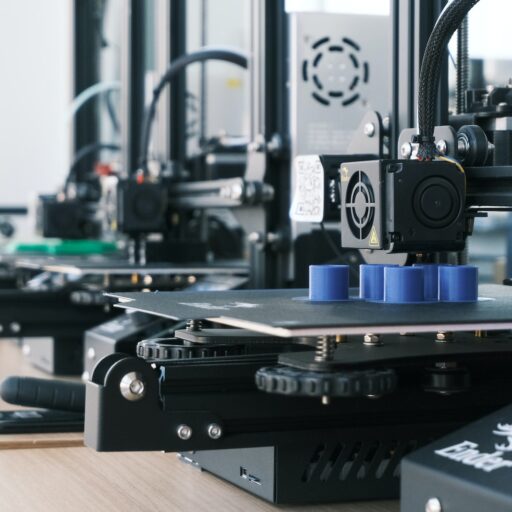
A 3D printer is a machine that creates three-dimensional objects from digital designs by adding material layer by layer. This process is known as additive manufacturing, which differs from traditional subtractive manufacturing methods such as machining or casting. The core components of a 3D printer include a build platform, a print head, and a control system.
How Does a 3D Printer Work? The Magic Behind the Machine
The process of 3D printing involves several steps:
- Design: Create a digital model of the object you want to print using computer-aided design (CAD) software or download a pre-made model from a website like Thingiverse.
- Slicing: Slice the digital model into thin layers using slicing software.
- Printing: Send the sliced model to the 3D printer, which builds the object layer by layer using the selected material.
The Big Showdown: FDM vs. SLA vs. SLS Explained
There are several 3D printing technologies available, each with its own strengths and weaknesses. Here’s a brief overview of three popular technologies:
- FDM (Fused Deposition Modeling): Uses melted plastic to build objects layer by layer. FDM is the most common technology used in desktop 3D printers.
- SLA (Stereolithography): Uses a laser to cure liquid resin, building objects layer by layer. SLA is known for its high accuracy and smooth surface finish.
- SLS (Selective Laser Sintering): Uses a laser to fuse together particles of a powdered material, building objects layer by layer. SLS is commonly used for industrial applications.
Essential 3D Printer Components: Anatomy of a Maker
A typical 3D printer consists of several key components:
- Build Platform: The surface on which the object is built.
- Print Head: The component that deposits the material (such as melted plastic or liquid resin).
- Control System: The brain of the printer, which interprets the digital model and controls the print head and build platform.
Choosing Your First Machine: A Guide to Desktop 3D Printers
When selecting a desktop 3D printer, consider the following factors:
- Budget: Determine how much you are willing to spend on a printer.
- Material: Decide which type of material you want to print with (e.g., PLA, ABS, or resin).
- Print Volume: Choose a printer with a build volume that suits your needs.
- Ease of Use: Consider a printer with a user-friendly interface and automatic calibration.
Filament, Resin, and Powder: Understanding 3D Printing Materials
3D printing materials come in a variety of forms, including:
- Filament: A spool of plastic wire used in FDM printers.
- Resin: A liquid photopolymer used in SLA printers.
- Powder: A powdered material used in SLS printers.
Slicing Software: The Brain Behind the Operation
Slicing software is used to convert digital models into instructions that the 3D printer can understand. Popular slicing software includes:
- Cura: A free, open-source slicing software developed by Ultimaker.
- Slic3r: A free, open-source slicing software developed by Alessandro Ranellucci.
Top 10 Applications of 3D Printing in 2024
3D printing has a wide range of applications across various industries, including:
- Aerospace: 3D printing is used to produce lightweight, complex components for aircraft and spacecraft.
- Healthcare: 3D printing is used to create custom prosthetics, implants, and surgical models.
- Automotive: 3D printing is used to produce prototype parts, tooling, and end-use components.
- Consumer Goods: 3D printing is used to create custom phone cases, jewelry, and other consumer products.
- Education: 3D printing is used in schools and universities to teach students about design, engineering, and manufacturing.
- Architecture: 3D printing is used to create scale models and prototypes of buildings and bridges.
- Art: 3D printing is used to create complex, customized art pieces.
- Fashion: 3D printing is used to create custom clothing, shoes, and accessories.
- Food: 3D printing is used to create custom food products, such as chocolates and cakes.
- Construction: 3D printing is used to create building components, such as walls and bridges.
Industrial vs. Hobbyist: Where Does Your Project Fit?
When deciding whether to use a 3D printer for industrial or hobbyist purposes, consider the following factors:
- Scale: Industrial projects typically require larger print volumes and higher precision.
- Material: Industrial projects often require more durable materials, such as metal or carbon fiber.
- Budget: Industrial projects typically have a larger budget for equipment and materials.
Health and Safety: Breathing Easy While You Print
When working with 3D printers, it’s essential to consider health and safety factors, such as:
- Ventilation: Ensure good airflow to prevent inhalation of fumes and particles.
- Protective Gear: Wear protective gear, such as gloves and safety glasses, when handling materials and printers.
- Fire Safety: Keep a fire extinguisher nearby and ensure that the printer is placed on a stable, heat-resistant surface.
Legal Aspects, Copyright, and Intellectual Property
When creating and sharing 3D printed designs, consider the following legal aspects:
- Copyright: Ensure that you have the necessary permissions or licenses to print and share copyrighted designs.
- Intelectual Property: Protect your own intellectual property by registering your designs and trademarks.
The Environmental Impact of Additive Manufacturing
3D printing can have both positive and negative environmental impacts, depending on the materials and processes used. Some benefits include:
- Reduced Waste: 3D printing can reduce waste by only using the necessary amount of material.
- Energy Efficiency: 3D printing can be more energy-efficient than traditional manufacturing methods.
However, some negative impacts include: - Material Usage: 3D printing can consume large amounts of material, particularly plastics.
- Energy Consumption: 3D printing can consume significant amounts of energy, particularly for large-scale prints.
3D Printing Glossary: Decoding the Jargon
Here are some common 3D printing terms to get you started:
- Additive Manufacturing: The process of creating objects by adding material layer by layer.
- FDM: Fused Deposition Modeling, a type of 3D printing technology.
- SLA: Stereolithography, a type of 3D printing technology.
- SLS: Selective Laser Sintering, a type of 3D printing technology.
Troubleshooting Common 3D Printing Failures
When encountering issues with your 3D prints, consider the following troubleshooting tips:
- Layer Shift: Check the print head and build platform for misalignment.
- Warpage: Ensure that the build platform is level and the print is properly secured.
- String: Adjust the print head temperature and retraction settings.
The Future of 3D Printing: What’s Next?
The future of 3D printing holds much promise, with advancements in materials, software, and hardware. Some potential developments include:
- Multi-Material Printing: The ability to print with multiple materials simultaneously.
- Large-Scale Printing: The ability to print large objects, such as buildings and bridges.
- Bioprinting: The ability to print living tissues and organs.
For more information on 3D printing and its applications, visit our 3D Printer Reviews and 3D Printing Industry News sections. You can also check out our 3D Printers for Small Businesses and 3D Printers for Education categories for more specific information.
To learn more about the cost of a really good 3D printer, visit our article on How Much Is a Really Good 3D Printer? Find Out in 10 Models (2025).
You can also check out the following products on Amazon:
- Monoprice Select Mini V2: Amazon
- Prusa i3: Amazon | Prusa Official Website
- Form 2: Amazon | Formlabs Official Website
For more information on 3D printing technologies, visit 3DPrinting.com.
Watch the first YouTube video on 3D printing to learn more about this technology.
Please note that the information provided is based on the summaries of the top competing articles, including https://en.wikipedia.org/wiki/3D_printing, https://formlabs.com/3d-printers/, and https://3dprinting.com/what-is-3d-printing/.